Both products combine multi-clip recording with a capable editor. Tight Studio adds smoother motion, AI narration, voice cloning, and direct iPhone or iPad capture; Tella adds one-click mistake, buffer, and silence cleanup plus an instant hosted page with chapters, transcript, feedback, and document tools.
Choose based on motion control, layout automation, or cloud delivery
Choose Tight Studio
When smoother automatic zoom and cursor motion, AI narration, personal voice cloning, direct iPhone or iPad capture, standalone shape annotations, custom-image privacy masks, and local Mac editing matter most.
Choose Tella
When you want one-click mistake, buffer, and silence cleanup or an edited video that stays immediately playable from one hosted link with chapters, transcript access, reactions, comments, document generation, analytics, and branded pages.
Where each stands out: Tight Studio provides smoother zoom and cursor motion, AI narration, voice cloning, direct mobile-device capture, and precise timeline music segments. Tella adds one-click cutting cleanup, instant hosted delivery, a richer viewer page, animated layout changes, AI-generated layout sequences, and Studio Voice microphone cleanup.
This is a first-party comparison. Ethan tested Tight Studio 3.1.5 and Tella's current editor on August 21, 2026, using the same Notion walkthrough to compare recording modes, zoom behavior, cursor treatment, visual styling, overlays, annotations, multi-clip assembly, automatic cutting cleanup, layouts, music, microphone controls, captions, AI voice, hosted playback, chapters, viewer feedback, and document generation. Mobile recording workflows were checked against each product's current recorder and documentation.
Screenshot note: The Tight Studio images are reused from our Screen Studio comparison test. The Tella images are downscaled or focused crops from the same Tella project so its controls remain readable.
Auto zoom and manual zoom controls
Auto zoom turns captured clicks and cursor movement into animated close-ups after recording. Manual controls let you correct the target, scale, and timing when the generated result does not frame the right detail.
The problem it solves
A full-screen capture can make the important button, field, or menu too small to follow. Building every close-up by hand takes time, but an unstable automatic camera can be just as distracting. The useful workflow combines good generation with precise cleanup controls.
Our take
Tight Studio wins for motion quality and control. Tella supports capable, editable automatic and manual zooms, but generation requires a button click and our test produced extra drifting between targets. We also found no motion-blur control, so pans felt less fluid.
Tight Studio
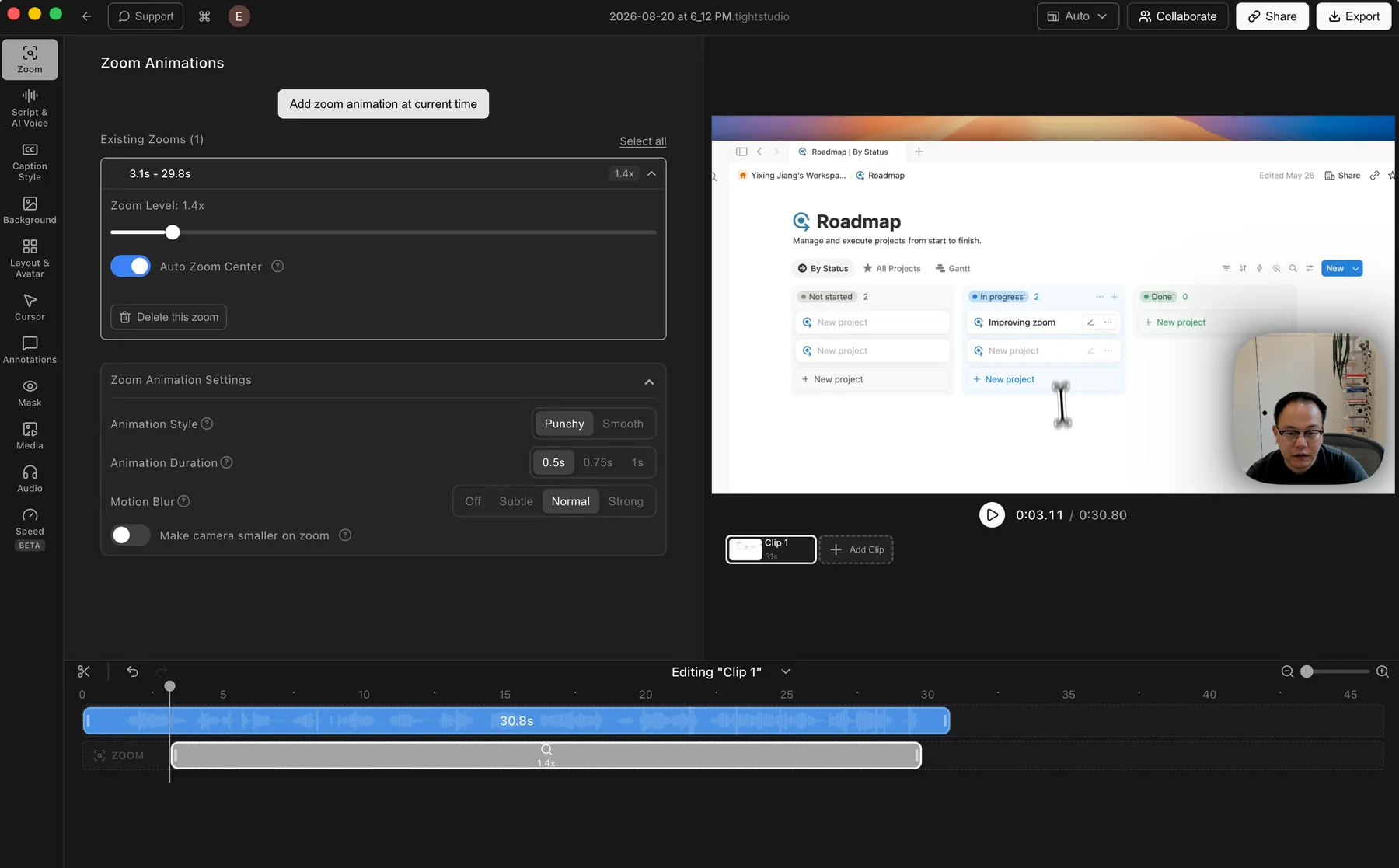
Tight Studio: automatic zoom is applied after recording, with motion controls available for each segment.
Pros
Applies automatic zooms after recording while keeping the original capture editable.
Manual zooms can be added and adjusted directly on the timeline.
Controls cover zoom level, auto-centering, animation style and duration, motion blur, and camera size.
Cons
Finding your preferred motion style may still take a little adjustment.
Automatic zoom depends on captured click and cursor data.
Tella
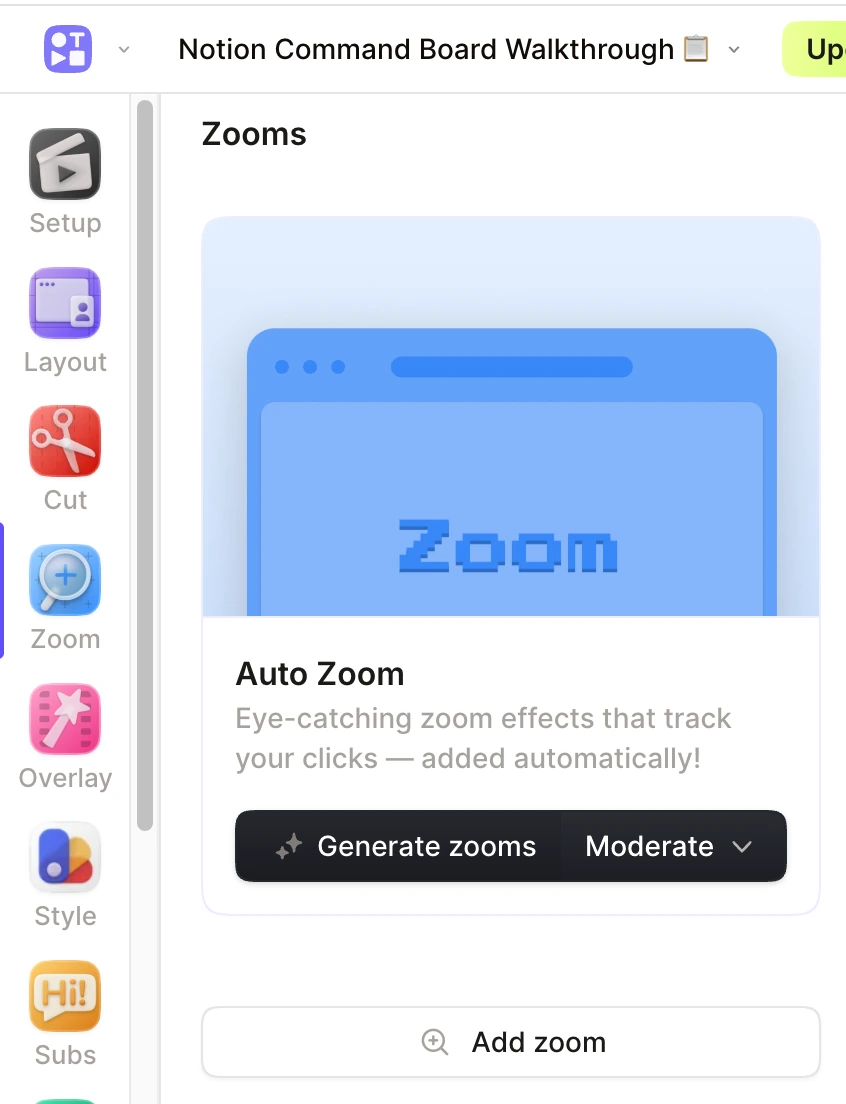
Tella: choose a style, then click Generate zooms after recording.
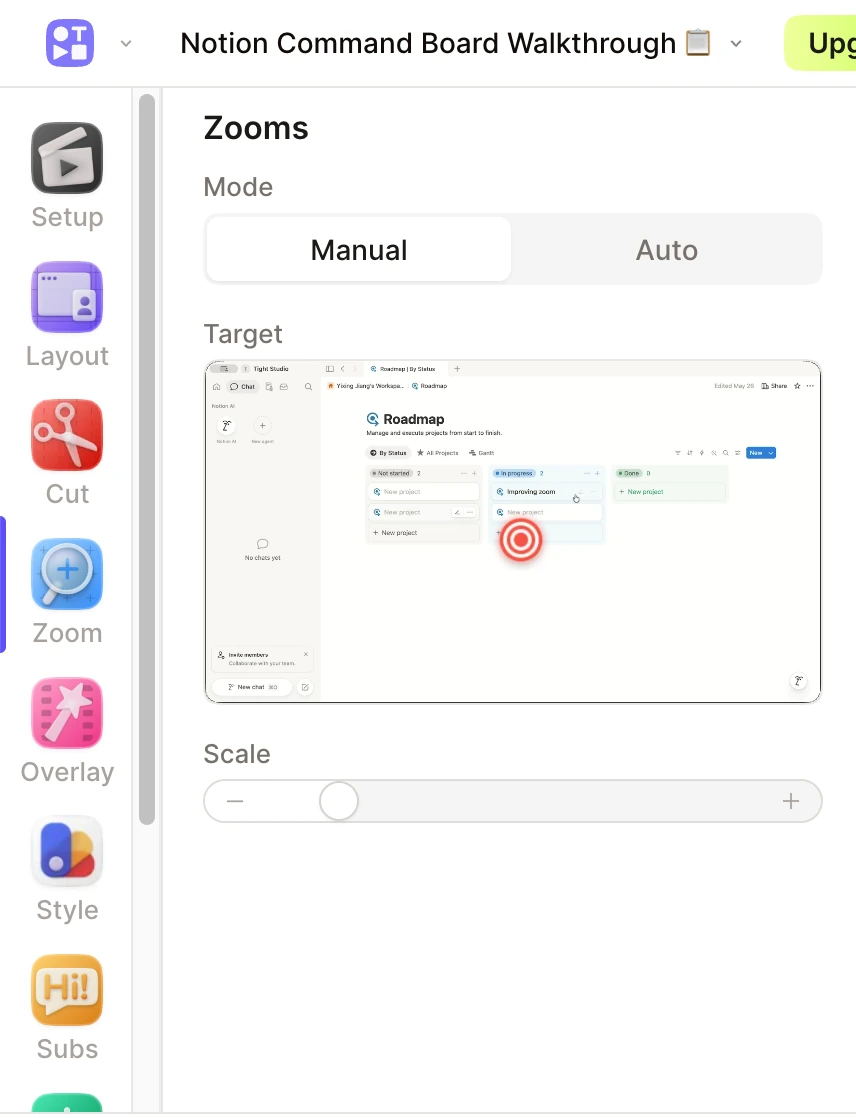
Tella: a selected zoom can use a fixed manual target and custom scale.
Pros
Generates editable zoom cards in Adaptive, Subtle, Moderate, or Intense styles.
Manual mode supports a fixed target and scale, while Auto mode can follow recorded cursor movement.
Zooms can be moved, resized, split, copied, pasted, retargeted, or connected for a continuous pan.
Cons
Auto Zoom is not applied automatically after recording; you open Zoom, choose a style, and click Generate zooms.
In our test recording, the generated motion added unnecessary drift and needed more cleanup to keep the frame settled.
We found no motion-blur control, so faster pans looked less fluid than Tight Studio's zoom motion.
Backgrounds and border styling
Backgrounds add contrast, padding, and brand personality around a screen recording. Border treatments change the edge and depth of the recorded screen or camera layer without rebuilding the composition elsewhere.
The problem it solves
A raw capture can feel flat or disappear into the video canvas. A background separates the interface from the frame, while a deliberate border or shadow can give the screen a more distinctive visual identity across every clip.
Our take
Tella wins for visual styling. Both products offer preset images, colors, gradients, and custom uploads. Tella adds animated backgrounds, Unsplash and workspace libraries, plus a distinctive border system with multiple shapes and treatments. Tight Studio keeps the background workflow simpler and includes direct padding controls.
Tight Studio
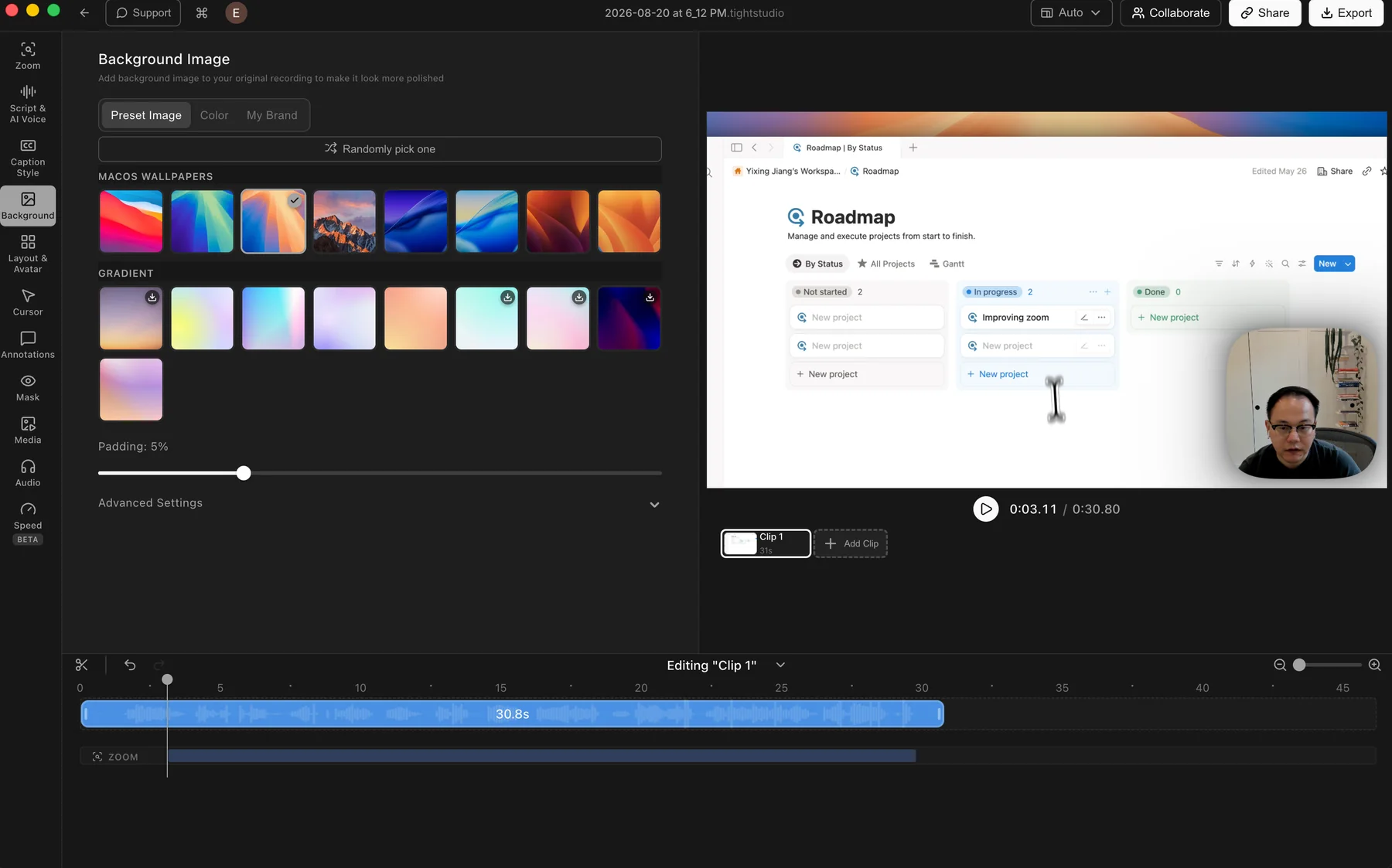
Tight Studio: preset wallpapers and gradients with color, brand image, and padding controls.
Pros
Includes preset macOS wallpapers and gradient backgrounds for quick styling.
Solid colors and uploaded brand images cover the main custom-background workflows.
Random selection and padding controls make it easy to change the frame quickly.
Cons
Does not include animated backgrounds or built-in Unsplash browsing.
Does not provide decorative border styles around the screen or camera layer.
Tella
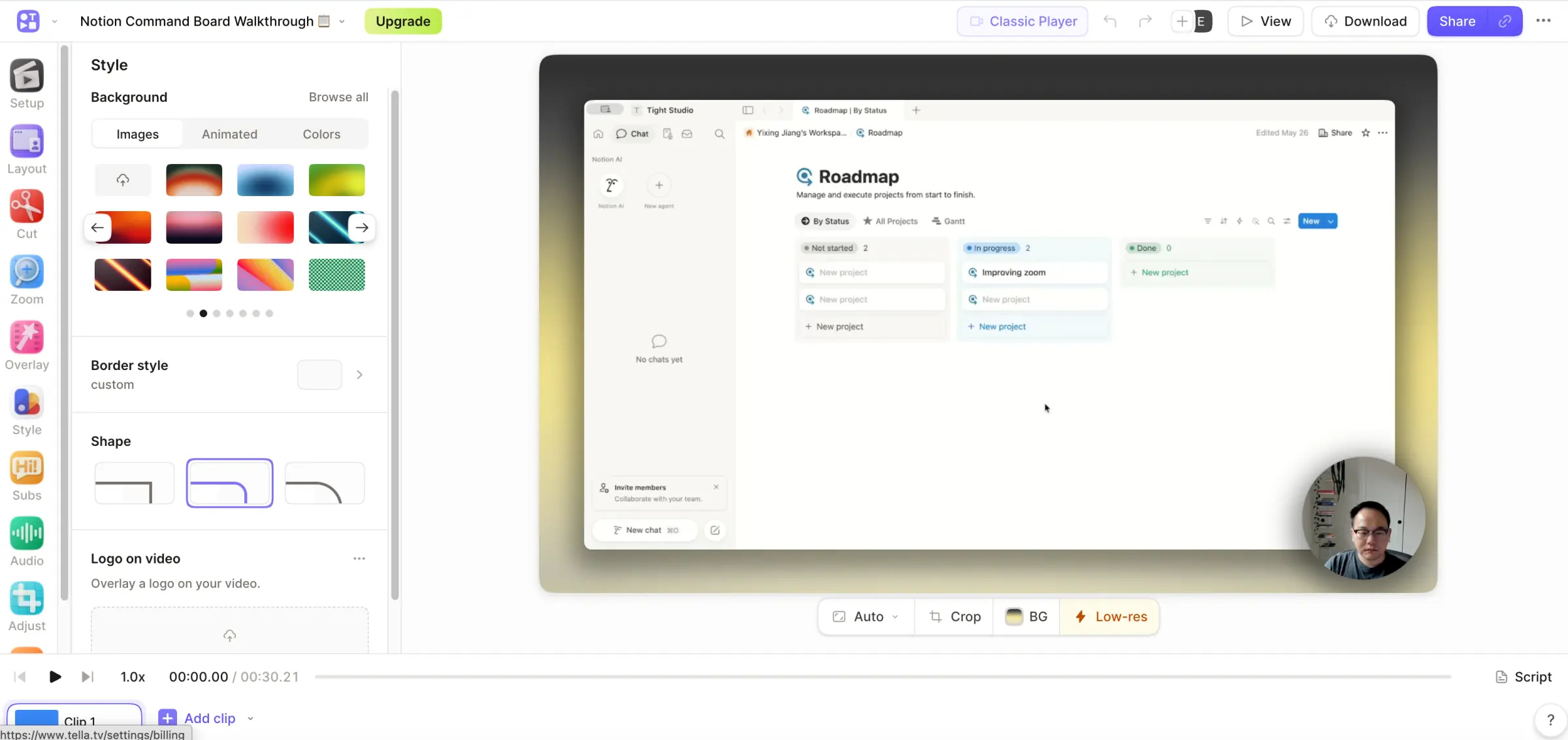
Tella: a broad background picker paired with a custom border style and corner-shape controls.
Pros
Offers a broad library of image, animated, solid-color, and gradient backgrounds.
Supports personal uploads, shared workspace backgrounds, and built-in Unsplash browsing.
Adds a distinctive border system with sharp or rounded shapes plus shadow, transparent, and solid treatments.
Applies background, shape, and border styling across the whole video by default, with a this-clip-only option.
Cons
The larger styling library takes longer to browse than Tight Studio's simpler background panel.
A one-off background or border treatment needs to be scoped to the current clip.
Cursor smoothing, size, and custom designs
A readable cursor guides attention through every interaction. Cursor sizing and image controls keep it visible at video scale, while path smoothing removes the small shakes that make raw mouse movement feel distracting.
The problem it solves
The default system pointer becomes easy to lose when a desktop capture is placed inside a padded video frame or watched on a smaller screen. A tiny or shaky cursor makes viewers work harder to understand where each action happens.
Our take
Tight Studio wins. It smooths cursor movement and provides post-recording controls for size, preset designs, custom uploads, and idle hiding. Tella captures cursor data for Auto Zoom, but in the editor we tested it did not offer cursor size, image, idle, or path-smoothing controls.
Tight Studio
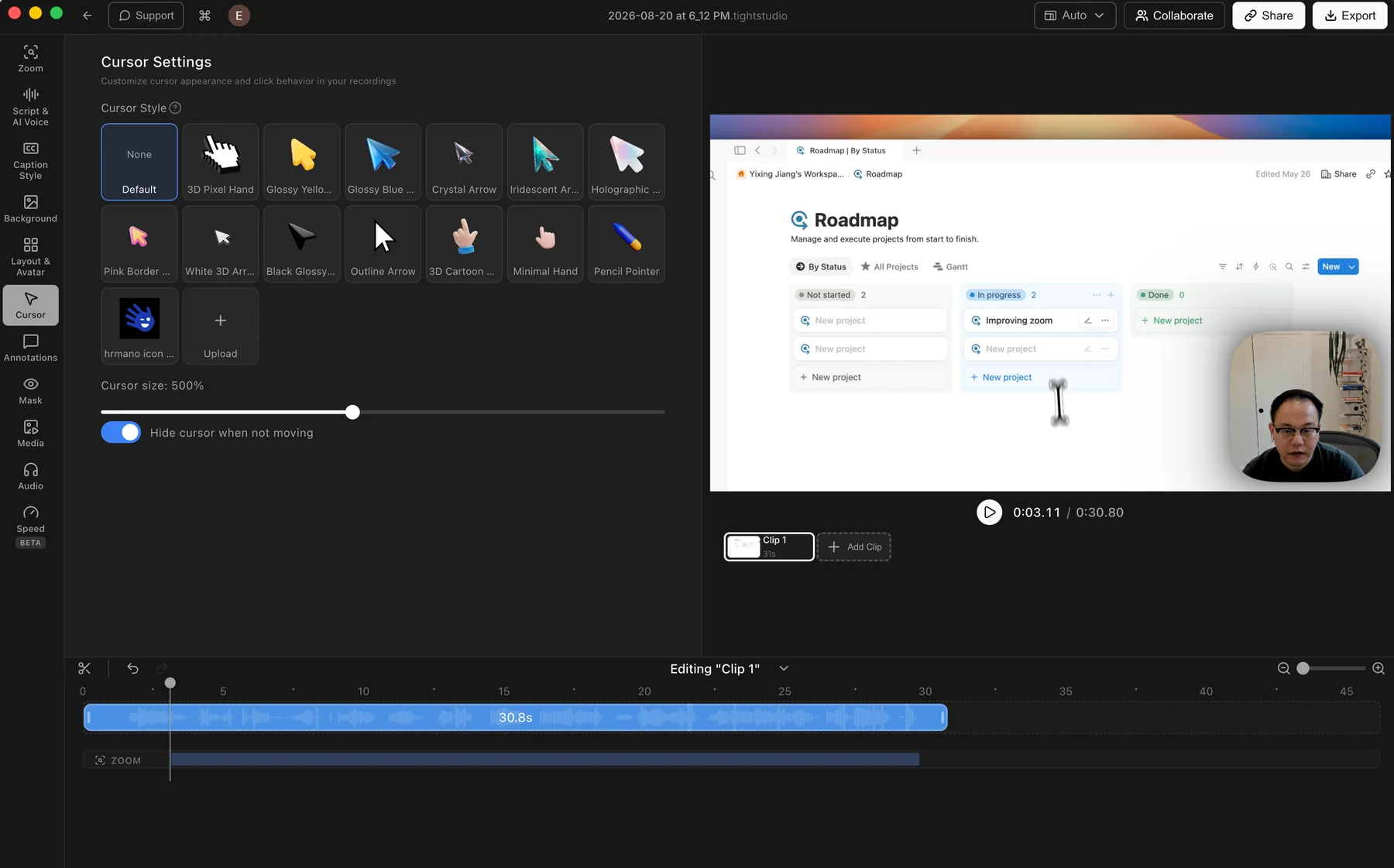
Tight Studio: smoothed cursor movement with preset designs, custom uploads, sizing, and hide-when-idle behavior.
Pros
Smooths the recorded cursor path so small hand movements look steadier and more deliberate.
Offers a varied library of preset cursor designs and adjustable cursor size.
Lets users upload a custom cursor image and hide the pointer when it is not moving.
Cons
Does not offer built-in click effects or click sounds.
Tella
No cursor styling panel found
Tella records mouse movement and clicks for Auto Zoom, and its Mac recorder exposes cursor preferences before capture. In the current editor we tested, we found no controls for cursor size, cursor replacement, hide-when-idle behavior, or cursor-path smoothing.
Captures mouse movement and clicks that can be used to generate tracking zooms.
Provides cursor preferences in the Mac recorder before capture.
Cons
Does not provide cursor size or replacement controls in the editor we tested.
Does not rebuild the cursor path with post-recording smoothing; our test retained more small hand jitter.
The system cursor can be difficult to follow after the screen recording is scaled down in the final frame.
Overlays, annotations, and privacy masks
Timed overlays add explanation, supporting visuals, focus, and privacy protection without changing the original recording. Shape annotations provide direct visual pointers when text or a highlight mask is not specific enough.
The problem it solves
A screen recording often needs a label, supporting image, emphasized area, or privacy cover after capture. Without built-in overlays, every addition requires another editor. Without standalone shapes, arrows and outlined callouts must be created elsewhere or approximated with text and media.
Our take
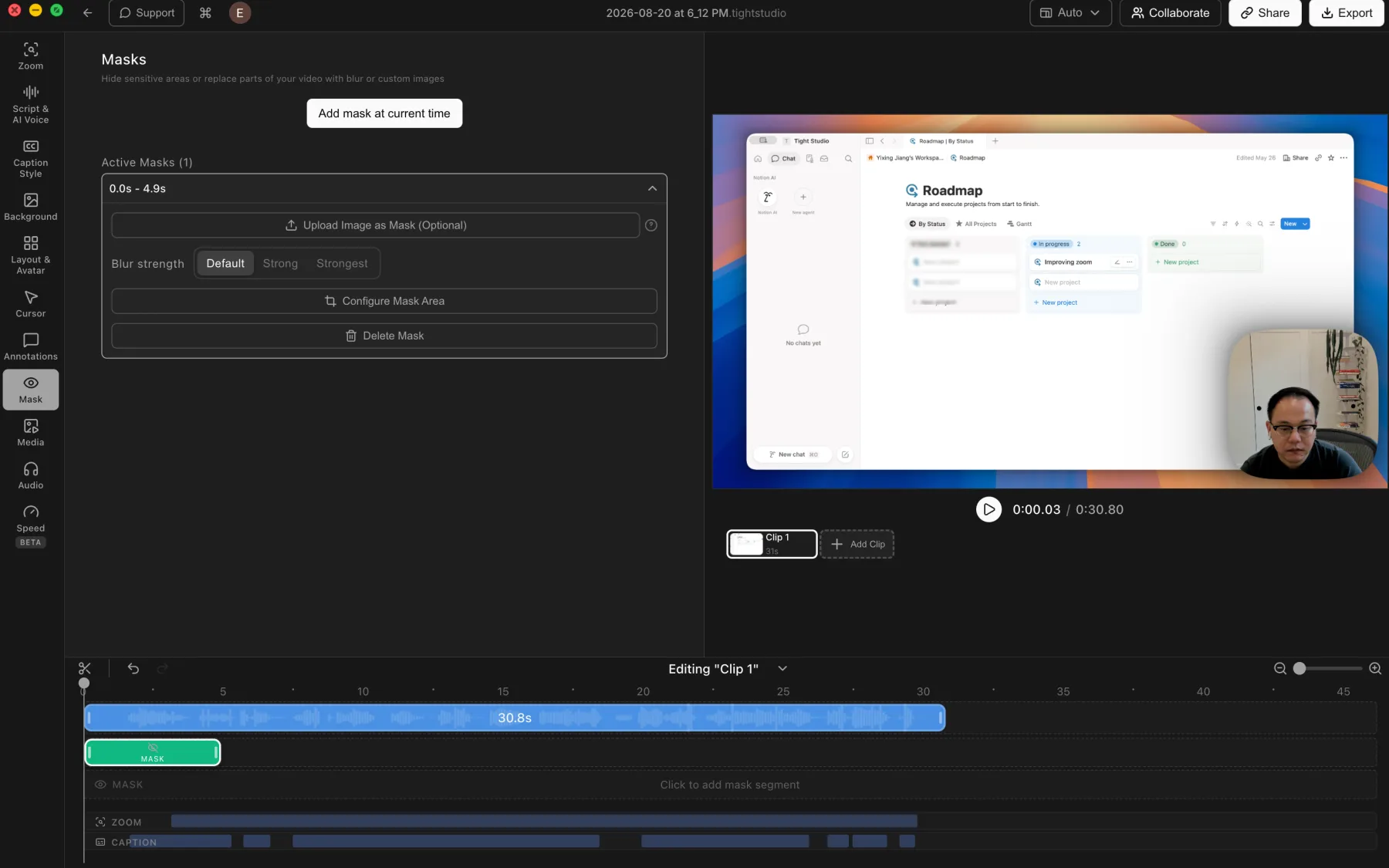
Tight Studio wins for annotation breadth, but Tella covers the core overlay workflow well. Both support timed text, media, highlights, and privacy blur. Tight Studio adds standalone arrows, lines, rectangles, and ellipses, plus custom-image privacy-mask replacement; we found no comparable shape tools in Tella's current Overlay panel.
Tight Studio
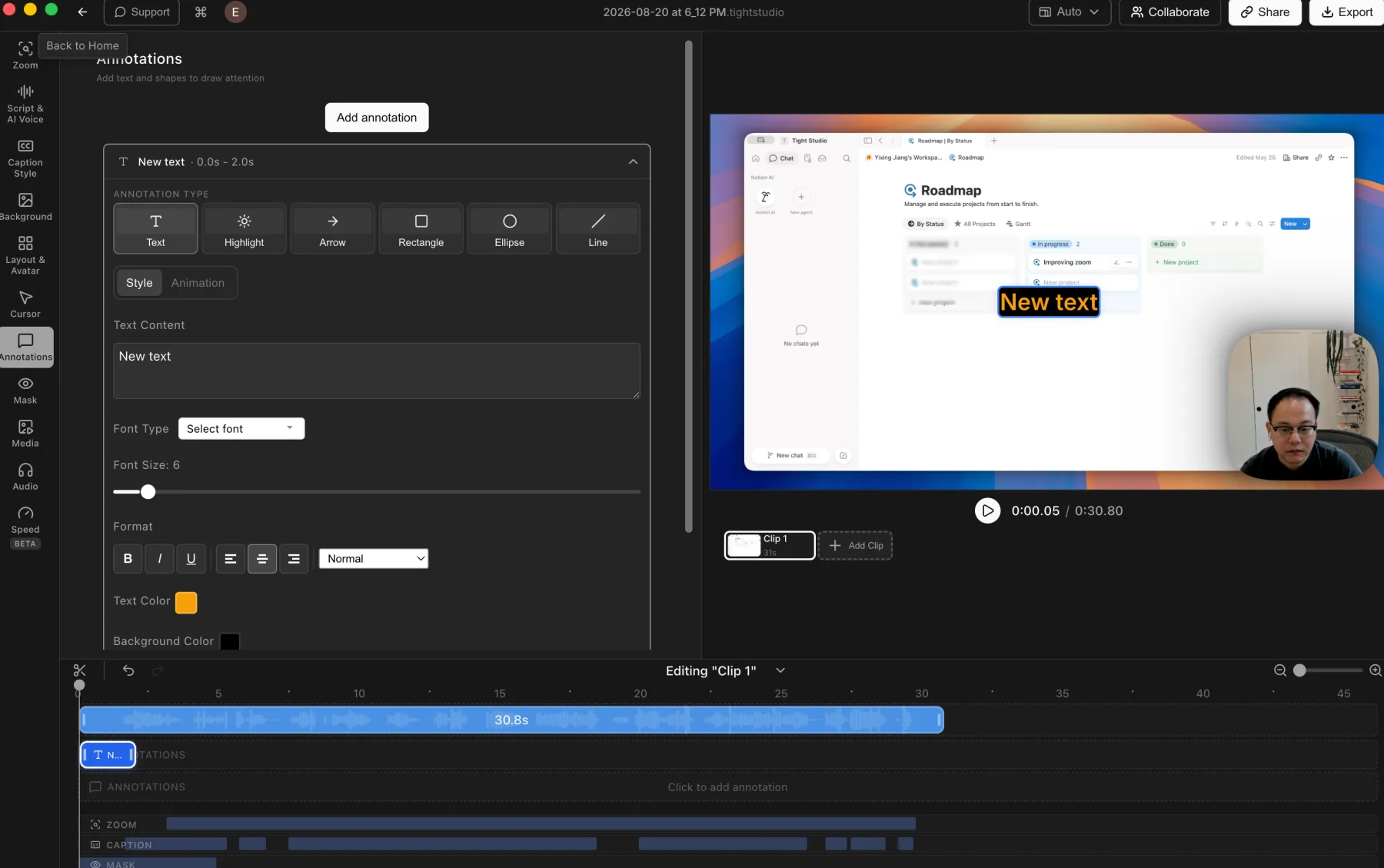
Tight Studio: styled text, highlights, arrows, rectangles, ellipses, and lines.
Tight Studio: timed privacy masks with blur strength and custom-image replacement.
Pros
Adds styled text, highlights, arrows, rectangles, ellipses, and lines with timeline control.
Places imported images and videos over the recording as timed media layers.
Privacy masks support multiple blur strengths or a custom replacement image.
Cons
The broader annotation library adds more controls to learn and adjust.
Annotations and masks still require manual placement and timing.
Tella
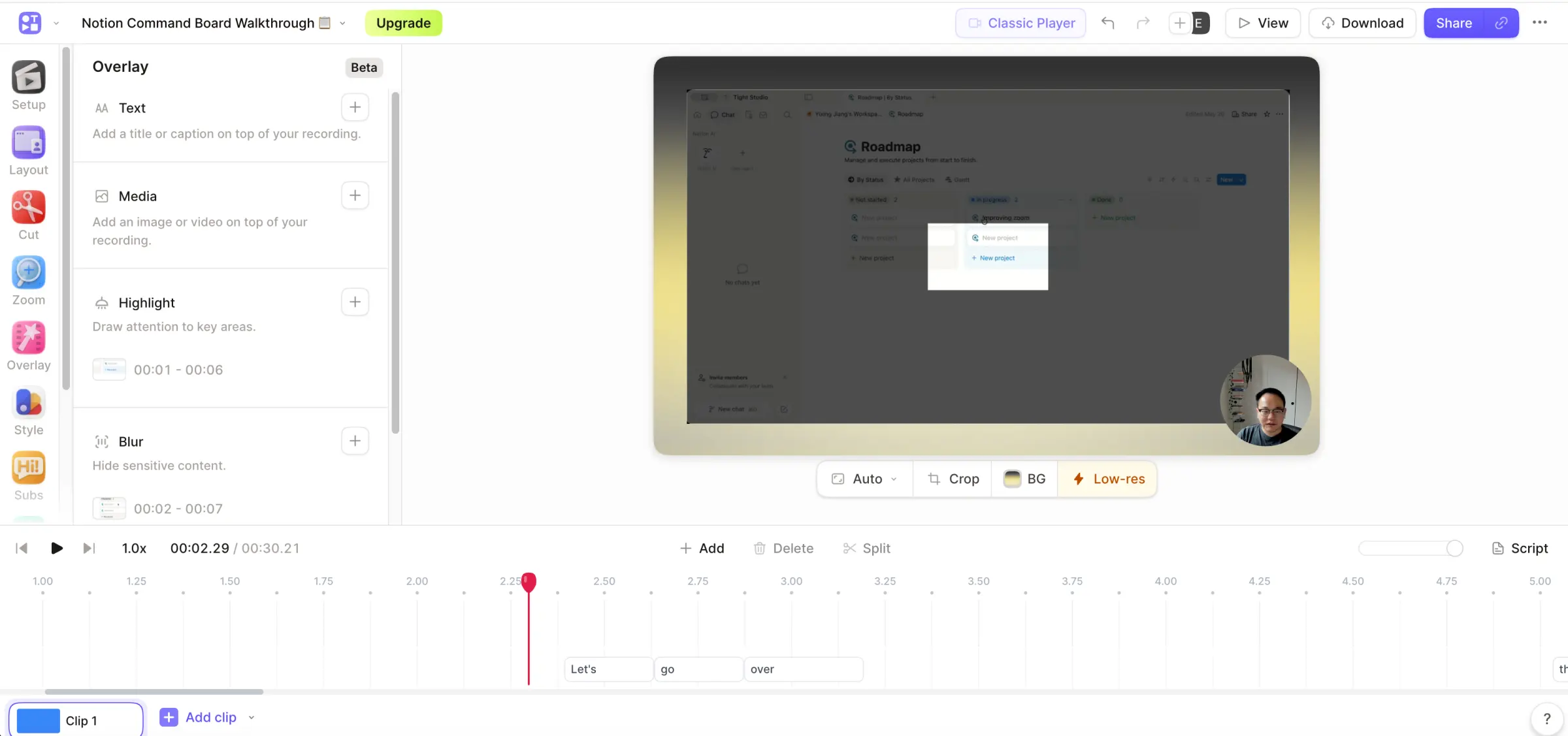
Tella: timed text, media, highlight, and privacy-blur tools in one Overlay panel.
Pros
Supports timed text layers with font, color, size, position, alignment, transition, custom fonts, and optional background styling.
Image and video overlays can be positioned, rotated, resized, timed, layered, and faded in or out.
Highlight masks dim surrounding content, while blur masks hide sensitive information.
Multiple highlight, blur, and media overlays can overlap without a conventional multi-track timeline.
Cons
In the current editor we tested, the Overlay panel does not provide standalone arrows, lines, rectangles, or ellipses.
Privacy blur does not offer Tight Studio's custom-image replacement option.
Multi-clip recording and imported clips
A clip-based workflow makes it natural to record a video in smaller sections, replace one mistake, add supporting footage, or reuse a strong segment without restarting the full project.
The problem it solves
Long one-take recordings make every mistake expensive. If the editor cannot add another recording or imported video directly, creators must assemble the final sequence elsewhere and export the project again.
Our take
Tie for the core multi-clip workflow. Both products record additional takes, import video clips, rearrange the sequence, and replace individual sections. Tella has the stronger built-in library reuse flow through Select from existing; Tight Studio keeps editing local and adds independent timed photo and video layers alongside the clip sequence.
Tight Studio
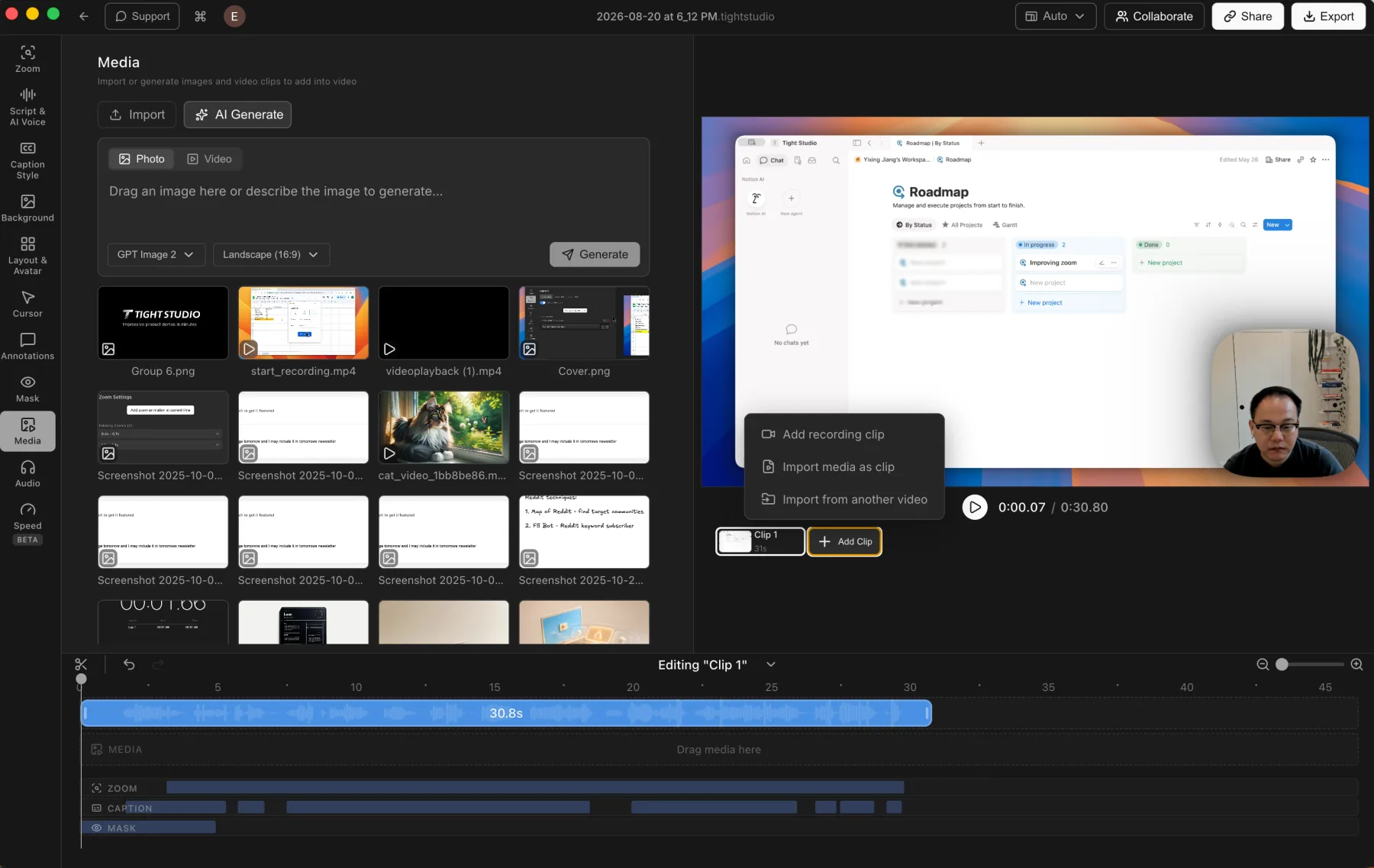
Tight Studio: additional recordings, imported clips, and timed media layers stay inside one local project.
Pros
Records additional takes and combines them inside the current project.
Imports another video as a clip without exporting the current project first.
Keeps photos and videos available as independent timed media layers alongside the clip sequence.
Processes and previews the full multi-clip project locally on the Mac.
Cons
Larger clip and media projects require more timeline organization than a single recording.
The workflow is currently limited to Apple Silicon Macs.
Tella
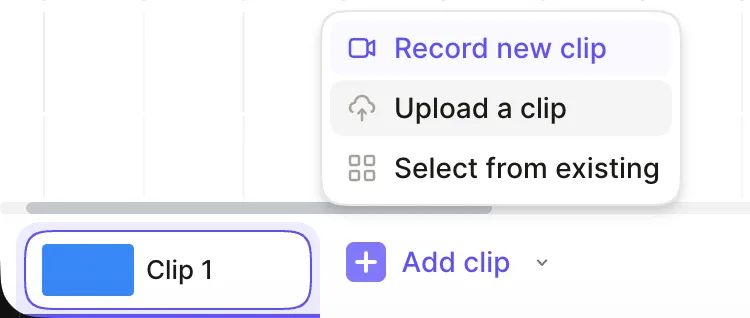
Tella: record, upload, or reuse an existing clip directly from the clip bar.
Pros
Treats clips as a core recording workflow rather than an advanced timeline feature.
Add clip offers Record new clip, Upload a clip, and Select from existing in one menu.
Existing personal or workspace clips can be searched by title or transcript, added, renamed, and rearranged.
Supports mixed camera-only, screen-only, and screen-and-camera clips plus individual clip re-recording.
Cons
Uploaded videos have more limited layout options than clips captured directly in Tella.
Local uploads and reused clips still enter Tella's cloud-based editing workflow.
One-click mistake, buffer, and silence removal
Automatic cleanup finds sections that usually require repetitive timeline work. A single reviewable action can trim quiet time at the clip edges, remove pauses throughout the recording, or identify spoken restarts and corrections.
The problem it solves
Manual cleanup means listening through the full recording, finding every unwanted pause or restart, splitting around it, and closing the gap. The work is simple but repetitive, and it grows with every clip in the project.
Our take
Tella wins decisively. Its Cut panel provides one-click mistake detection, start and end buffer removal, and bulk silence removal with Natural, Fast, and Faster pacing modes. The editor reports the count and estimated time saved before applying cuts, and the results remain adjustable. Tight Studio 3.1.5 supports precise manual timeline cuts, but its released editor does not expose a comparable automatic cleanup panel.
Tight Studio
Manual cleanup in the released editor
Tight Studio 3.1.5 lets creators select, split, and delete timeline ranges, but the public editor we tested does not expose a consolidated one-click panel for finding mistakes, trimming start and end buffers, or removing every silence in a clip.
Pros
Provides precise timeline selection, splitting, deletion, and trim adjustments.
Keeps every cleanup decision visible and editable in the local project.
Makes it easy to replace a poor section by recording another take inside the project.
Cons
Does not expose a public one-click AI mistake finder in the tested 3.1.5 editor.
Does not provide a released Remove buffers action for silent time at the beginning and end.
Does not offer Tella's released bulk silence-removal panel or Natural, Fast, and Faster pacing modes.
Tella
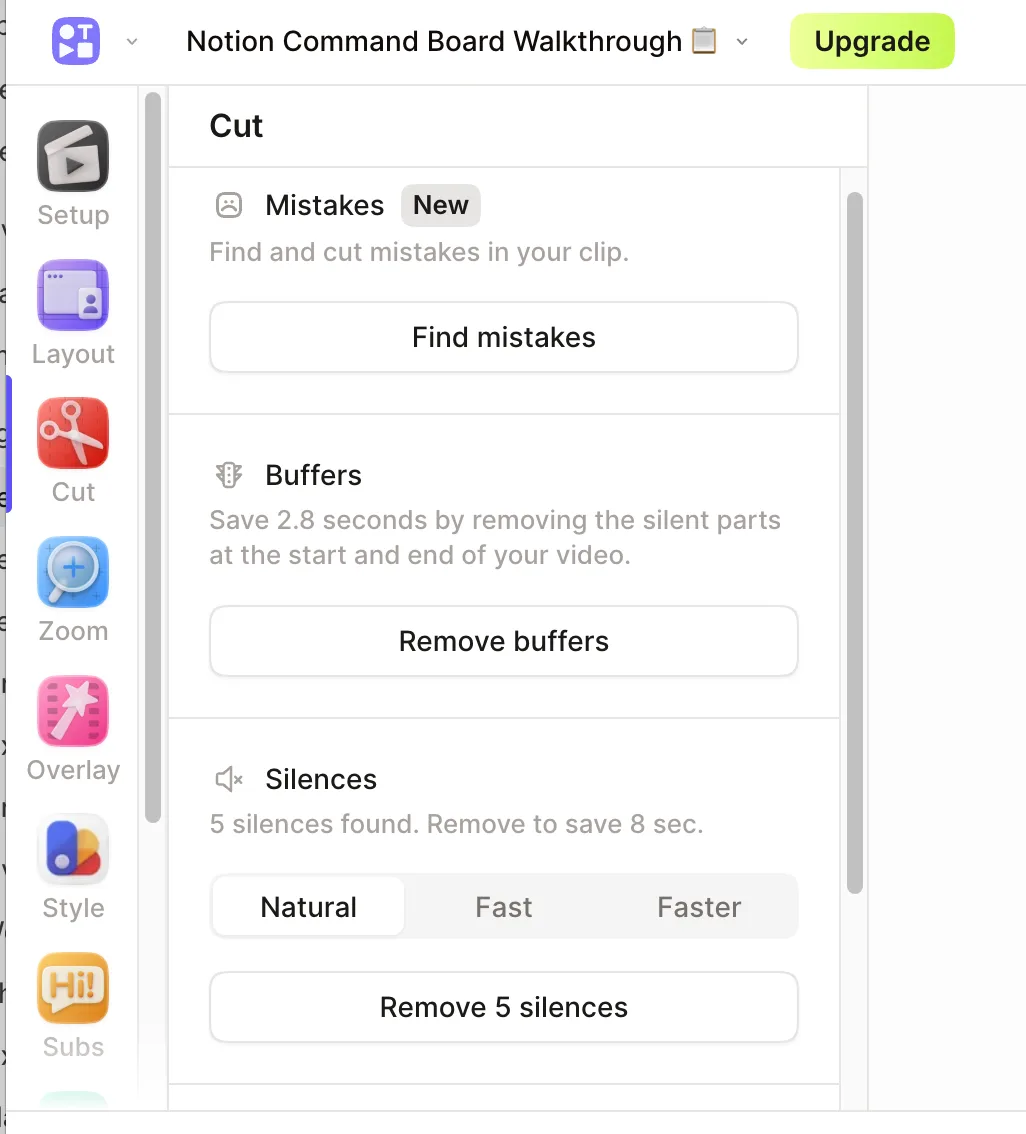
Tella: one Cut panel finds mistakes, trims silent buffers, and removes detected pauses with selectable pacing.
Pros
Find mistakes analyzes the clip and proposes cuts for spoken restarts and corrections.
Remove buffers trims silent time at the start and end in one click and previews the time saved.
Silence removal shows the detected count and estimated time saved before applying the cuts.
Natural, Fast, and Faster modes control how aggressively pauses are removed, and the resulting timeline cuts remain adjustable or resettable.
Cons
Automatic cuts still need a playback review because intentional pauses or quiet moments may be removed.
Fast and Faster modes can make conversational pacing feel abrupt when used too aggressively.
Mistake detection depends on the spoken transcript, while silence detection depends on usable audio across the clip's active tracks.
Camera-only recording and recorder availability
Camera-only capture records the presenter and microphone without forcing an empty or unnecessary screen track. Recorder availability determines whether that workflow starts in a native desktop app, directly in the browser, or both.
The problem it solves
Sometimes the camera is the complete recording rather than an overlay on a screen. Requiring a screen capture adds setup and creates footage that must be hidden later. A browser option also matters when installing a desktop app is not practical.
Our take
Tie for camera-only recording; Tella wins for recorder availability. Both products record camera and microphone without a screen and can mix that take with screen-recording clips. Tella offers native Mac and Windows recorders, a browser recorder, and a Chrome extension. Tight Studio is limited to Apple Silicon Macs, but recording, editing, preview, and rendering stay inside one native local application.
Tight Studio
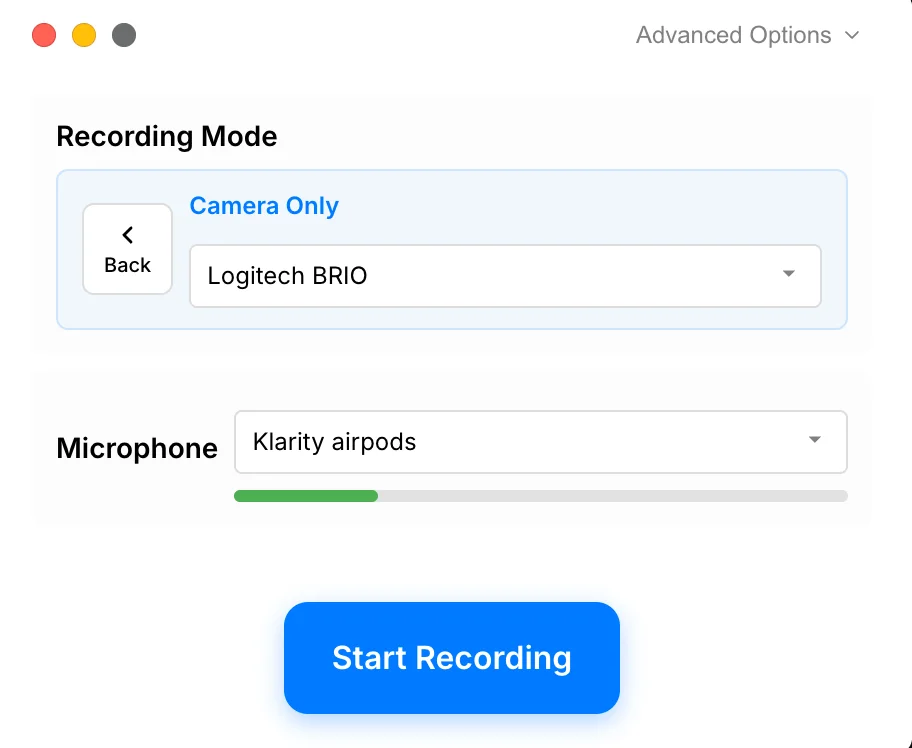
Tight Studio: select Camera Only, choose a camera and microphone, then record without capturing the screen.
Pros
Provides a dedicated Camera Only mode for recording the camera and microphone without screen content.
Lets users select camera and microphone devices before recording.
Keeps camera-only takes inside the same native Mac editor used for screen recordings and multi-clip projects.
Records, previews, and renders the project locally on the Mac.
Cons
Does not provide a browser-based recorder.
Currently requires an Apple Silicon Mac.
Tella
Camera-only recording on Mac and web
Tella can record the camera and microphone without a screen in its native Mac app or browser recorder. It also offers screen-only and combined screen-and-camera capture, with native apps for Mac and Windows plus a Chrome extension.
Provides native camera-only recording without requiring a screen capture.
Offers both a native Mac recorder and a web recorder that works without installing an app.
Also supports screen-only and combined screen-and-camera recording, plus a native Windows recorder and Chrome extension.
Camera-only clips can be combined with screen recordings inside the same multi-clip video.
Cons
The Mac app handles capture natively, but finished recordings open in Tella's web editor rather than remaining in a fully local desktop editor.
The broader recorder choice introduces different capture capabilities depending on whether the Mac app, browser, Windows app, or extension is used.
Direct iPhone and iPad recording
A direct device recorder treats a connected iPhone or iPad as a capture source, so the mobile screen enters the editor without routing it through another app or transferring a separate recording first.
The problem it solves
Mobile app demos are harder to update when capture requires QuickTime window setup or a separate recording on the device. Each workaround adds another step before editing and makes a multi-take project less direct.
Our take
Tight Studio wins. It records a connected iPhone or iPad directly into the editor and keeps mobile takes inside the same multi-clip workflow. Tella can still edit mobile footage, but its documented workflows require recording a QuickTime window or recording on the device and uploading the file afterward.
Tight Studio
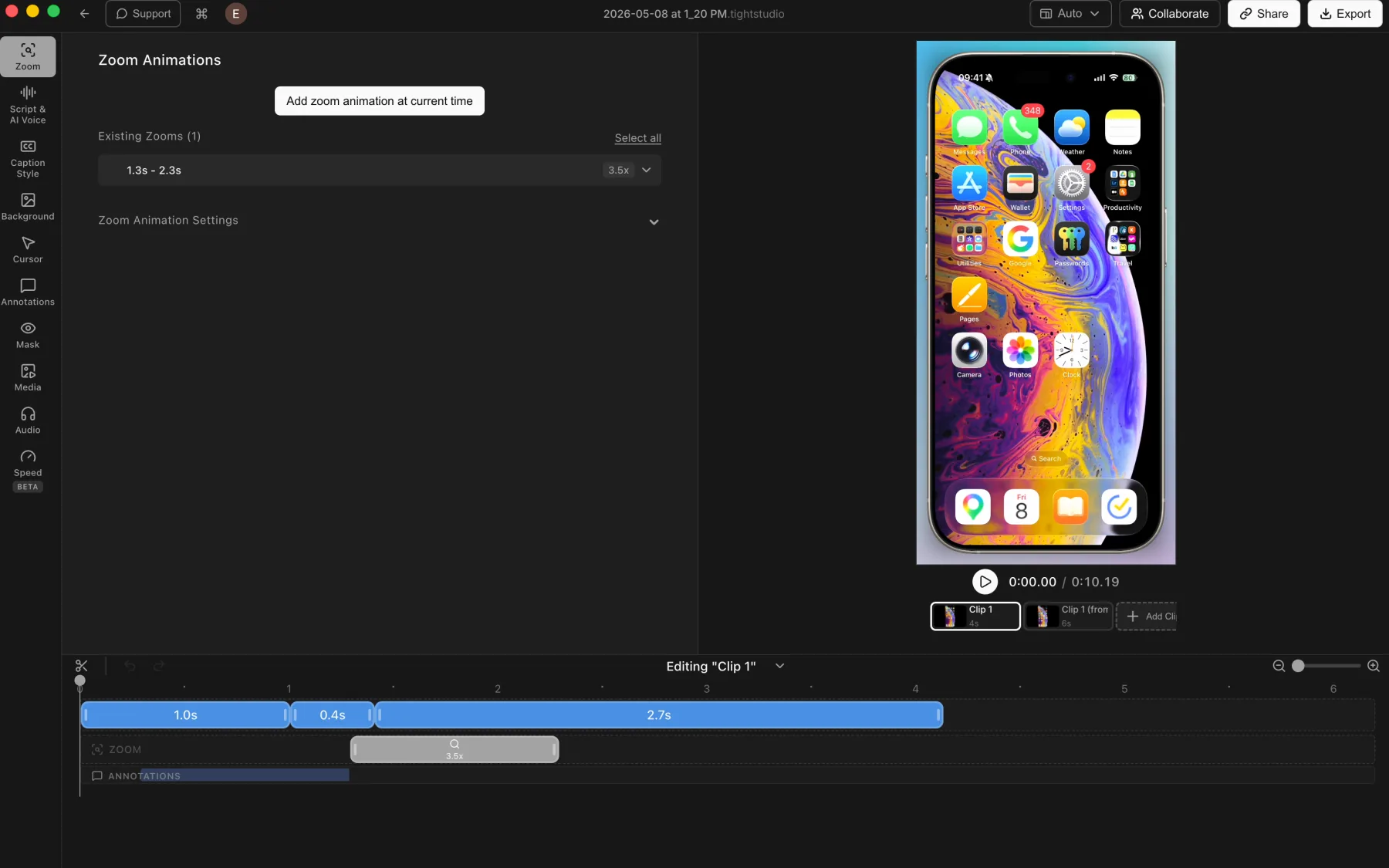
Tight Studio: a connected iPhone recording with multiple clips, zoom, and annotation tracks.
Pros
Captures a connected iPhone or iPad directly into the Tight Studio editor.
Applies the usual post-recording tools, including manual zooms, backgrounds, captions, masks, and annotations.
Combines multiple mobile-device takes as clips inside one project.
Cons
Requires connecting and trusting the device before recording.
Touch gestures do not provide desktop-style cursor metadata, so zooms may need manual placement.
Tella
No native connected-device recorder
Tella documents two mobile-demo workarounds: show the connected iPhone or iPad in QuickTime and record that window, or record on the device and upload the finished file. Tella does not provide a direct connected-device capture mode inside its recorder.
Can record a QuickTime window that is displaying a connected iPhone or iPad.
Can upload a screen recording created on the device, then trim, crop, zoom, and style it in Tella.
Cons
Requires QuickTime as an extra capture layer or a separate on-device recording and transfer step.
Does not expose the iPhone or iPad as a direct recording source inside Tella.
The documented workflow does not provide a dedicated device frame or touch-gesture metadata.
Layouts, transitions, and AI automation
Layout changes shift attention between the screen and presenter without requiring a new recording. Smooth transitions make those changes feel intentional instead of cutting abruptly between two compositions.
The problem it solves
One fixed composition can obscure important screen content or leave the presenter too small when their explanation matters. Manually choosing every layout and timing every change also becomes repetitive across a longer video.
Our take
Tella wins for layouts. Both products provide strong camera and screen presets with timed layout changes. Tella adds smooth transitions between layouts by default, reusable custom arrangements, and Auto Layouts that uses AI to generate an editable sequence of layouts and transitions. Tight Studio's layout library is capable, but its layout changes are manual and do not currently animate between segments.
Tight Studio
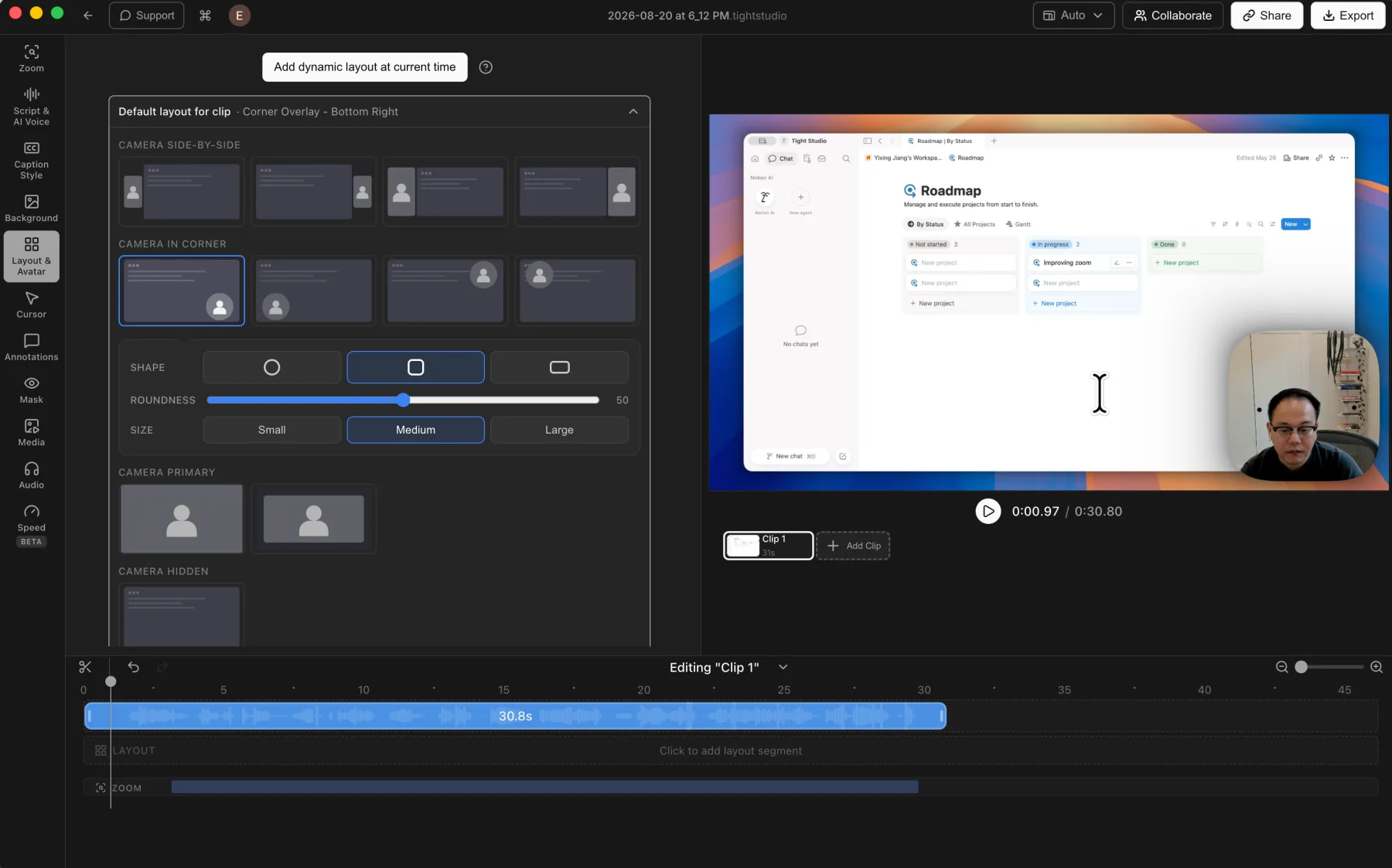
Tight Studio: multiple camera and screen layouts can be placed across the timeline.
Pros
Offers side-by-side, corner overlay, camera-primary, and camera-hidden layout styles.
Supports camera position, shape, size, mirroring, and layout changes across the timeline.
Keeps each layout segment editable, including its timing and camera treatment.
Cons
Does not currently animate smoothly between layout segments; the composition changes directly at the segment boundary.
Does not generate a sequence of layout changes automatically with AI.
Tella
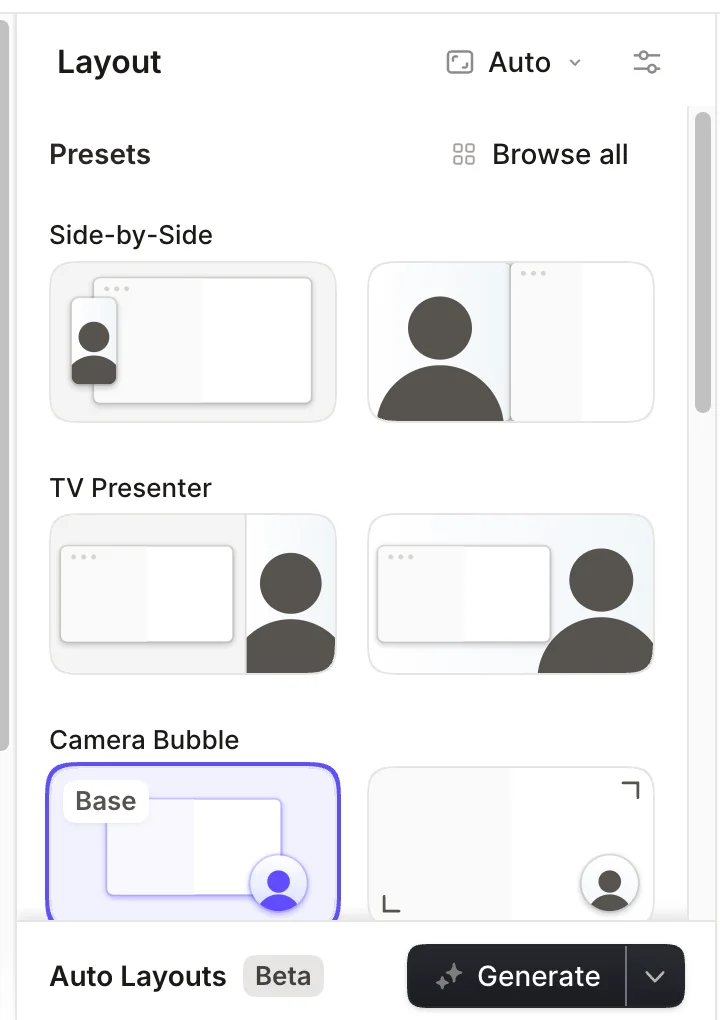
Tella: a broad preset library paired with AI-powered Auto Layouts.
Pros
Offers picture-in-picture, 50/50 side-by-side, TV Presenter, screen-dominant, camera-only, and screen-only arrangements.
Adds multiple layouts within one clip and inserts a smooth transition between segments by default.
Lets users adjust transition timing, choose a smooth animation or hard cut, and set a Gentle, Moderate, or Snappy animation style.
Auto Layouts uses AI to generate an editable sequence of layouts and transitions from a chosen template.
Custom arrangements can be saved, reused, and applied across matching clips.
Cons
Auto Layouts requires Tella Pro or Premium.
Uploaded video clips receive only two basic layouts because Tella does not have separate screen and camera tracks for them.
Background music and microphone cleanup
Background music adds energy and pacing, while microphone controls keep the spoken explanation clear. The best workflow makes both easy to adjust without flattening every audio source into one track.
The problem it solves
A soundtrack that runs at the wrong moment can compete with narration, while fan noise, room echo, and inconsistent microphone volume can make even a polished screen recording feel unfinished. Music timing and speech cleanup solve different parts of that audio problem.
Our take
Split decision. Both products include built-in music, custom uploads, volume controls, and direct microphone adjustment. Tella wins microphone cleanup with Studio Voice, which removes noise and enhances speech. Tight Studio wins music timing because it can place and trim multiple music segments on selected timeline ranges; Tella uses one whole-video background track.
Tight Studio
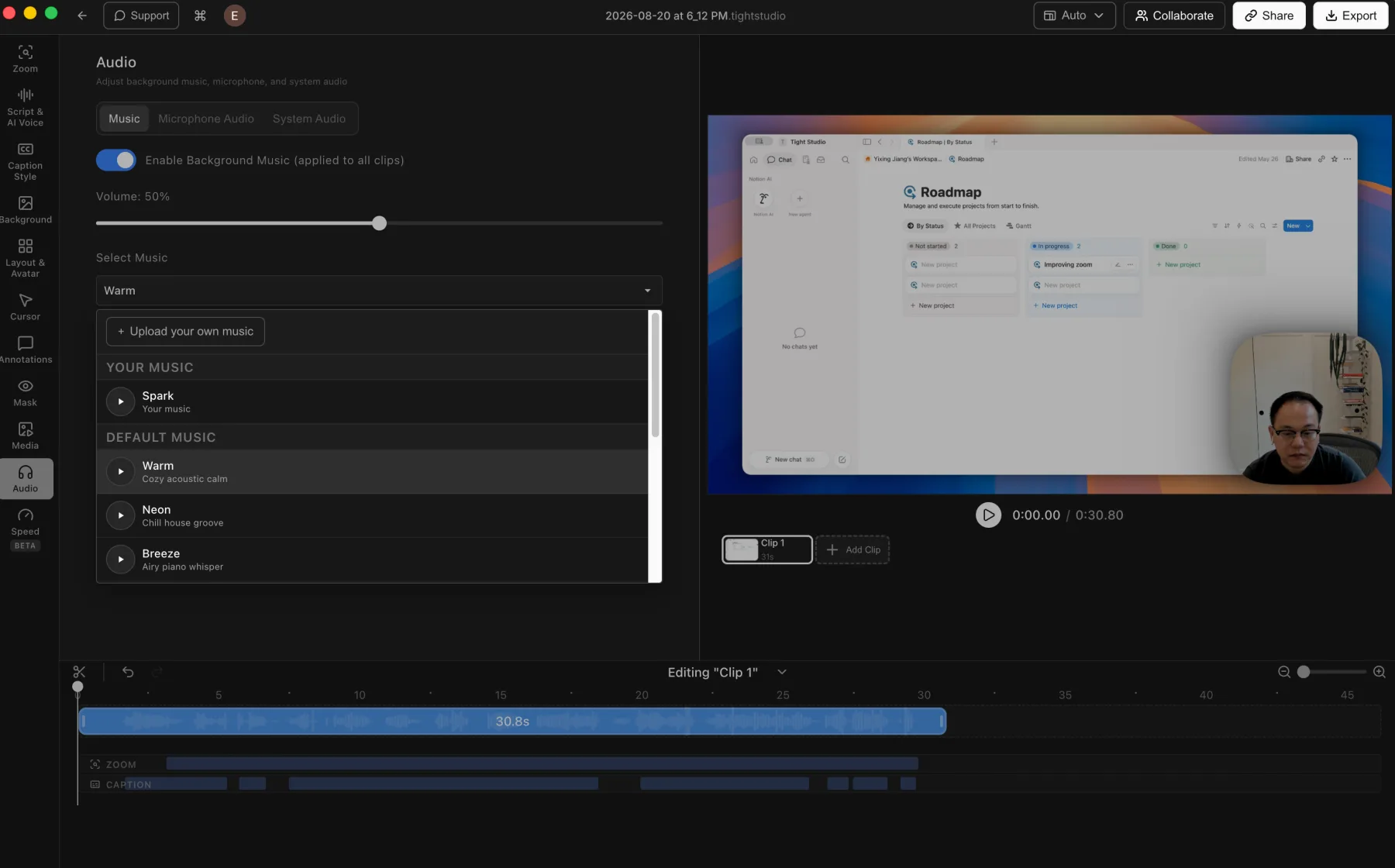
Tight Studio: built-in or uploaded music can be placed and trimmed on selected timeline ranges.
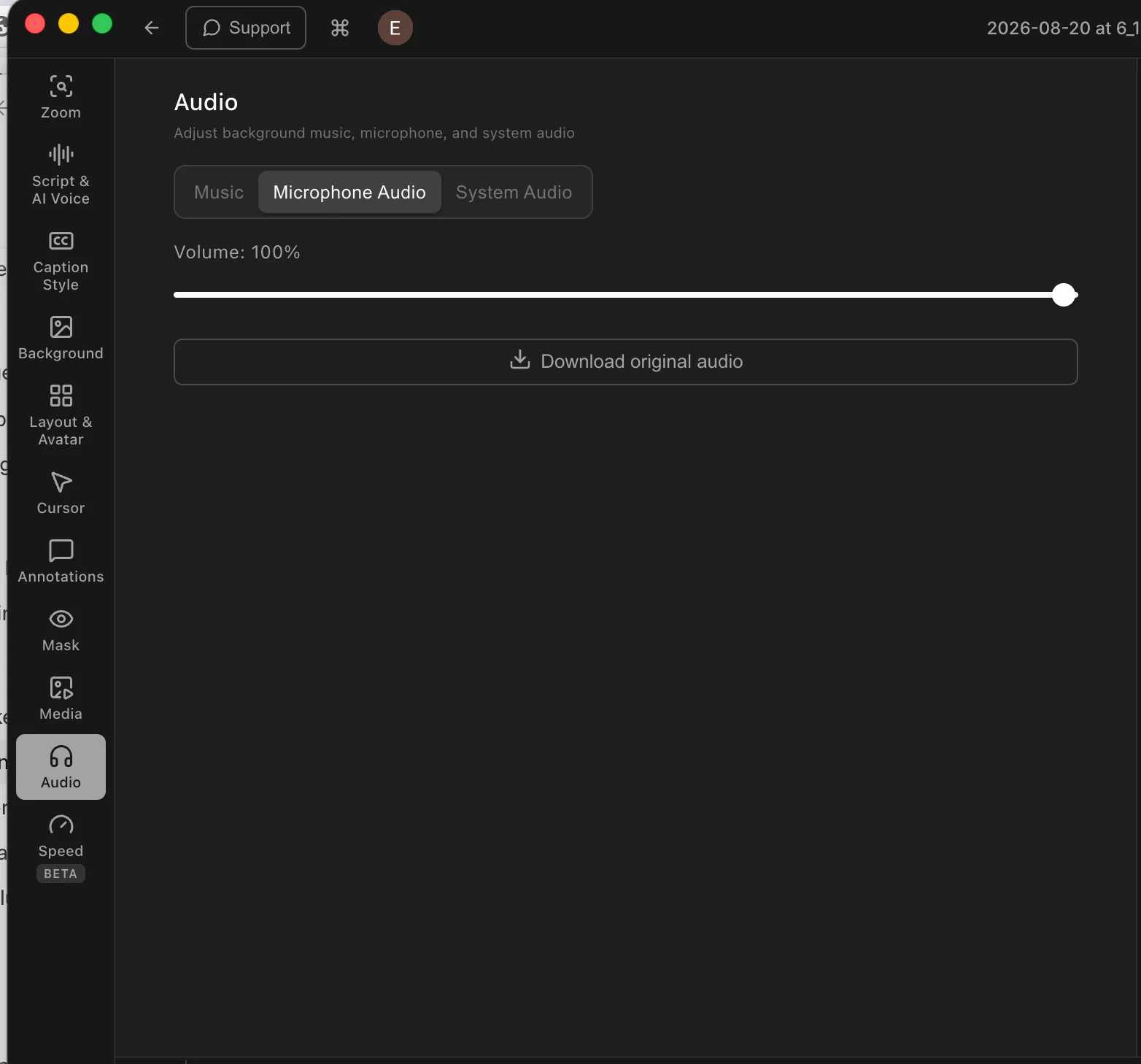
Tight Studio: the recorded microphone can be muted or adjusted directly.
Pros
Includes a built-in music library and supports uploaded music files.
Places multiple music segments on chosen timeline ranges, with independent timing, trimming, and volume.
Lets users mute the recorded microphone or adjust its volume directly.
Cons
Does not currently provide automatic microphone noise removal or speech enhancement.
Precise music timing uses the advanced music-segment workflow rather than a single whole-video soundtrack control.
Tella
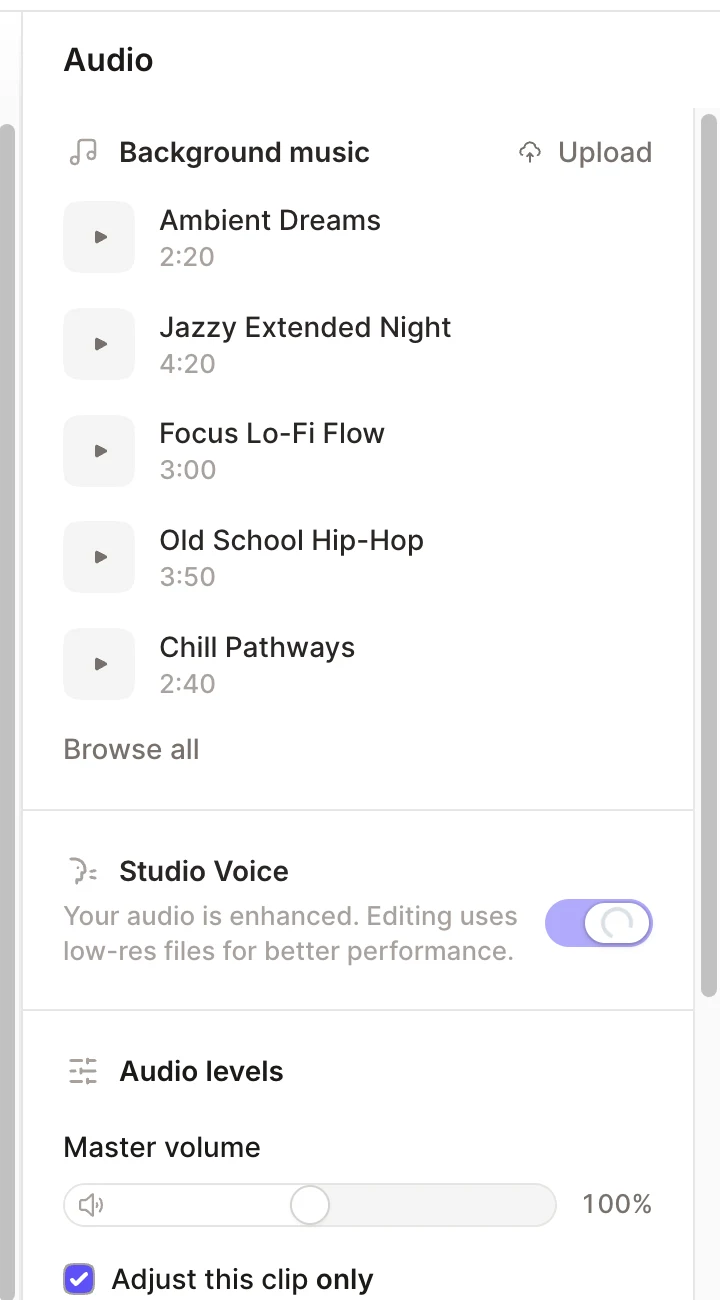
Tella: built-in or uploaded music plus Studio Voice microphone enhancement in one Audio panel.
Pros
Includes a built-in background-music library and supports uploading a custom track.
Provides preview, volume, replacement, and removal controls for the soundtrack.
Studio Voice removes background noise, boosts speech volume, and gives the microphone a more consistent studio-style finish.
Microphone, system, media, and background-music levels can be adjusted for the whole video or an individual clip.
Cons
Uses one background-music track across the whole video rather than placing separate tracks on selected timeline ranges.
Does not support importing a standalone voiceover or narration audio track.
Studio Voice generation can take several minutes, temporarily blocks editing and playback, and must be regenerated after adding new clips.
AI narration and voice cloning
AI voice turns an edited script into finished narration. It can replace another recording pass when a line changes, a take contains noise, or the original speaker is not available to record again.
The problem it solves
Traditional narration fixes mean recording a new take and matching its timing, tone, and microphone sound to the surrounding video. Script-generated speech makes the spoken track editable, but only when the editor supports voice generation directly.
Our take
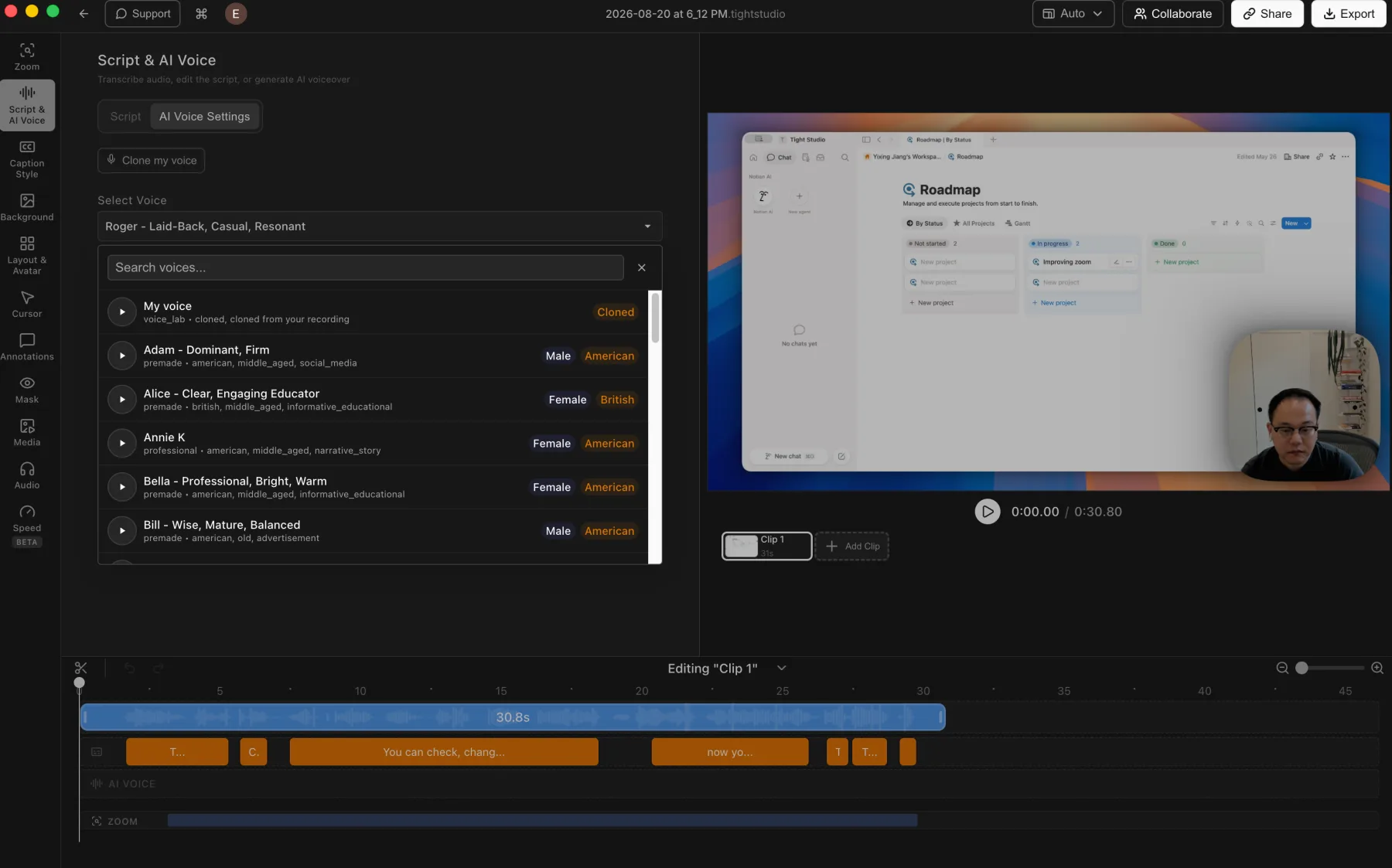
Tight Studio wins decisively. It generates narration from script text, includes a searchable premade voice library, and supports personal voice cloning. Tella's Studio Voice is useful microphone cleanup, but it enhances speech that was already recorded and does not generate or clone a voice.
Tight Studio
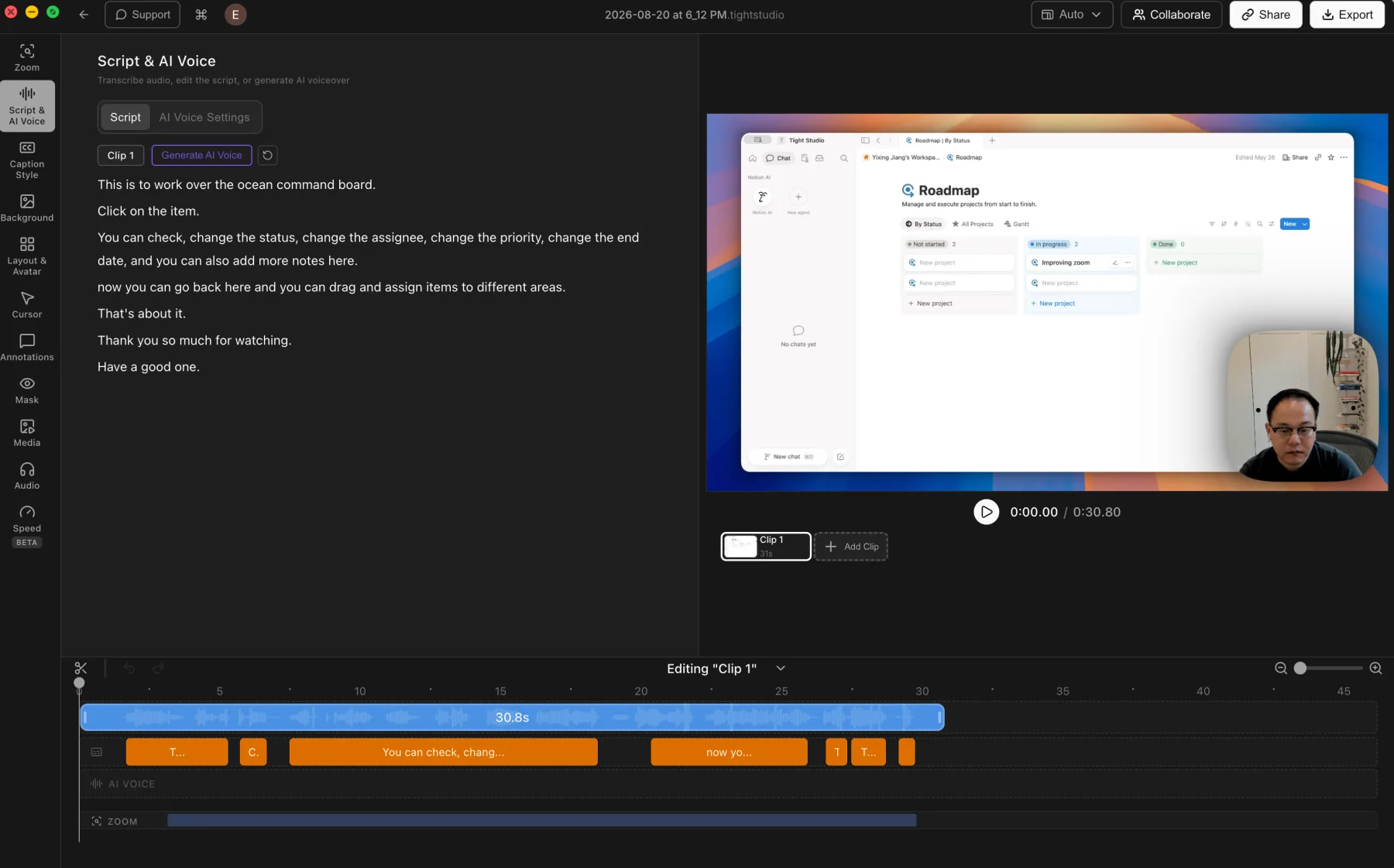
Tight Studio: voice cloning and a searchable voice library connected to the editing timeline.
Pros
Turns an edited script into generated narration without recording another take.
Lets users clone their own voice or choose and preview a searchable library of premade voices.
Keeps generated narration on a dedicated AI Voice track for timeline-based editing.
Cons
Generated speech may still need previewing and script adjustments to match the intended delivery.
AI voice generation is a Pro feature rather than part of the free editing workflow.
Tella
No AI narration or voice cloning
Tella's Studio Voice uses AI to improve an existing microphone recording. It removes noise and evens out speech, but it does not generate narration from text or clone a speaker's voice.
Studio Voice can improve recorded speech by removing noise, boosting volume, and making it more consistent.
Cons
Does not generate spoken narration from an edited script.
Does not provide personal voice cloning or a searchable AI voice library.
Narration changes require another recorded take or an external text-to-speech workflow.
Automatic captions, styles, and per-word timing
Automatic captions remove the transcription step after recording. Word-level synchronization keeps active-word effects and transcript navigation aligned with speech, while a clear editor makes names, product terms, and sentence breaks easy to correct.
The problem it solves
Generated captions are useful only when timing and text can be trusted. If the editor exposes only large caption blocks, correcting one early or late word can disturb the surrounding sentence. Strong styles also need to remain readable without rebuilding the captions in another editor.
Our take
Tie for the core caption workflow. Both products generate captions after recording, retain word-level synchronization, offer polished built-in styles, and provide strong text-editing interfaces. Tella stands out for click-to-word transcript navigation and find and replace. Tight Studio keeps the script beside synchronized timeline segments and additionally supports correcting an individual word's source timing.
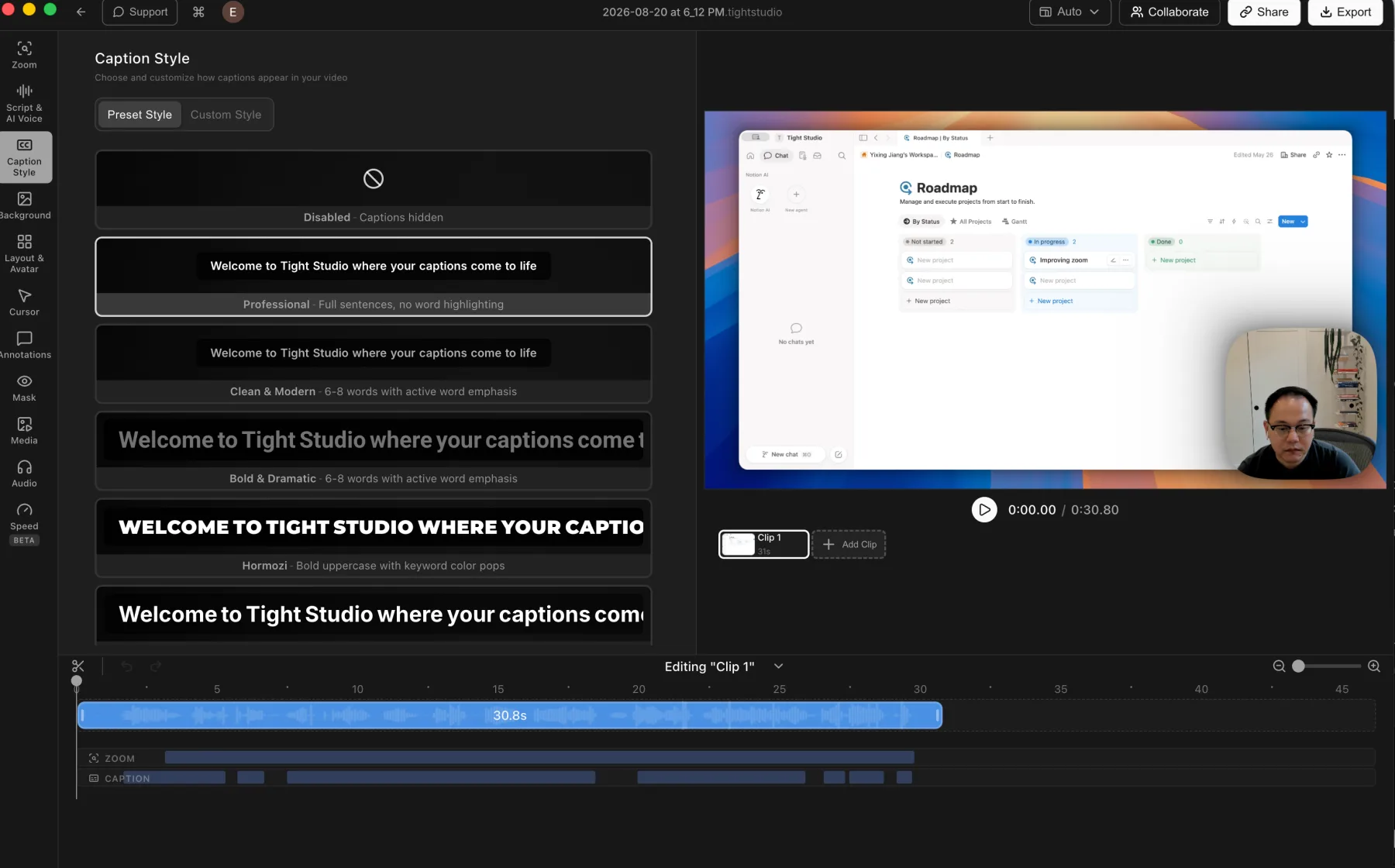
Tight Studio: a broad preset library plus detailed custom caption styling.
Pros
Generates captions after recording and keeps the full script available for correction.
Retains per-word timestamps and supports correcting the timing of an individual caption word.
Includes Professional, Clean and Modern, Bold and Dramatic, and Hormozi-style presets.
Provides detailed controls for typography, active-word emphasis, background, position, and animation.
Cons
Uses ElevenLabs cloud transcription rather than an offline local model.
Transcription requires an internet connection and sends audio to a cloud processor under the stated no-retention policy.
Tella
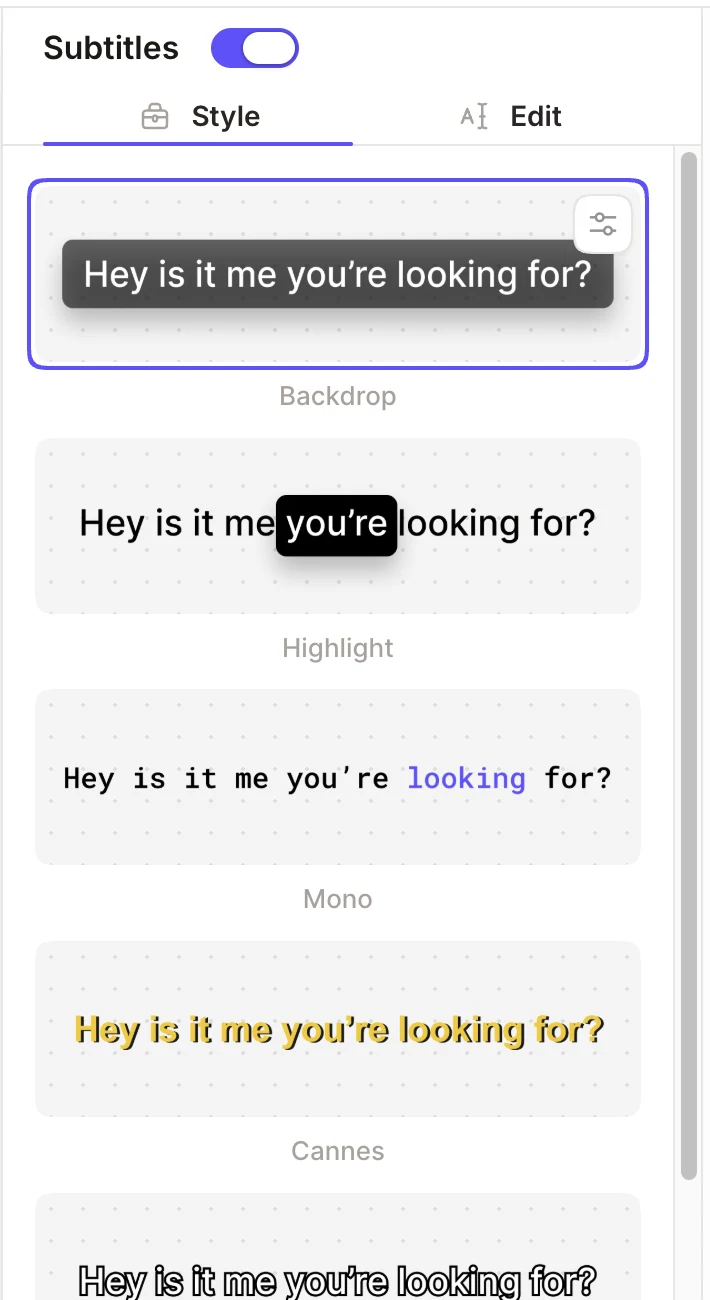
Tella: a polished built-in style library with word-synchronized emphasis.
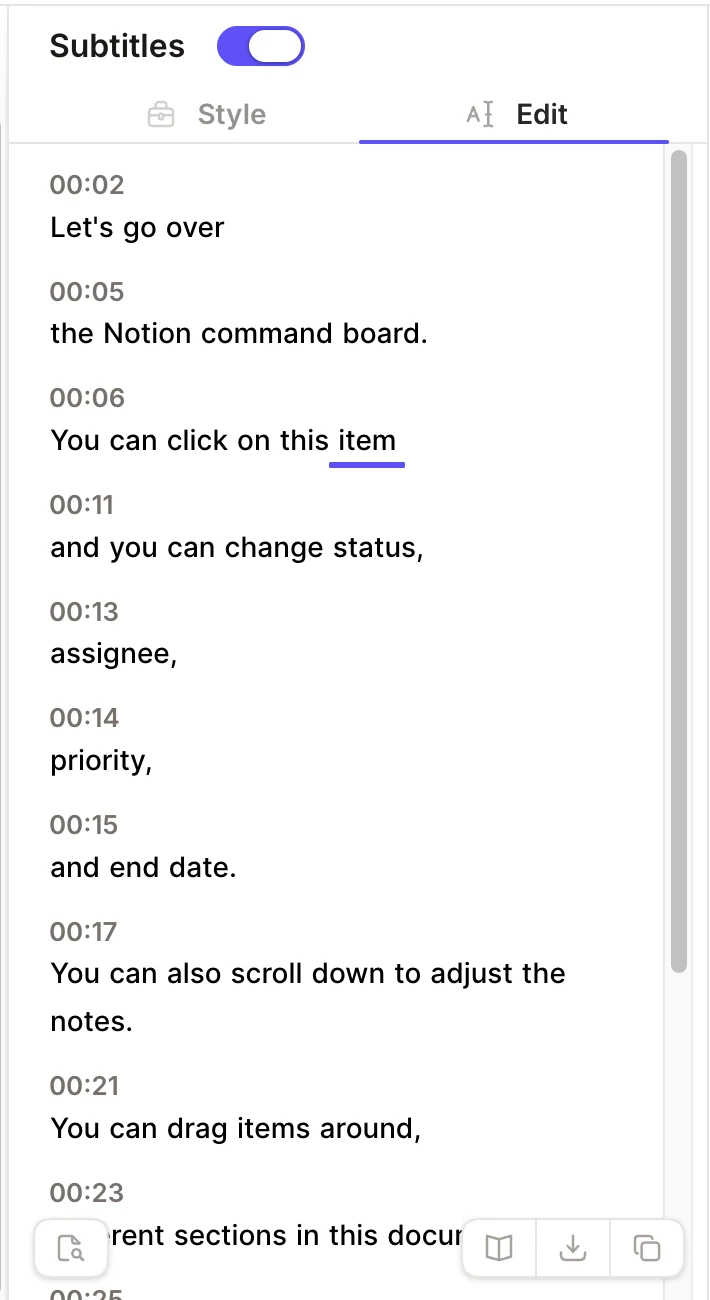
Tella: timestamped subtitle blocks with clear inline editing and word-level playback position.
Pros
Automatically transcribes most recorded videos and makes subtitles available when processing finishes.
Preserves word-level synchronization, including click-to-word navigation and current-word playback feedback.
Offers polished built-in styles such as Backdrop, Highlight, Mono, and Cannes, with additional appearance controls.
Provides a clear subtitle editor with timestamps, inline text correction, and find-and-replace for repeated errors.
Cons
Automatic transcription and processing depend on Tella's cloud workflow rather than an offline local model.
Subtitle text correction is separate from transcript-based video cutting, and precise segment boundaries are fine-tuned on the timeline.
Instant hosted playback and viewer tools
A hosted view page turns the latest edit into a link-based deliverable. Chapters and transcripts help viewers navigate, feedback tools keep discussion beside the video, and document generation can repurpose the recording without another manual transcription step.
The problem it solves
An export-first workflow adds a render and file-transfer wait every time the edit changes. A persistent hosted page is faster when the deliverable is a link and viewers need navigation, context, or a place to respond.
Our take
Tella wins decisively for hosted delivery. Its edited video remains playable behind the existing share link without a separate MP4 export, and the view page adds chapters, transcript access, reactions, comments, and AI document generation. Tight Studio also creates browser share links and can reuse the same URL, but each edited version must render and upload before viewers receive it, and its hosted page is a simpler player.
Tight Studio
Share after render and upload
Tight Studio renders the current edit to a video file, uploads it, and returns a browser link. Re-sharing can preserve the same URL, but viewers receive the new cut only after the render and upload finish.
Creates a browser-playable link without making the viewer download a file.
Can keep the same share URL when an edited project is rendered and uploaded again.
Supports link, password, email-restricted, private, and embed delivery options.
Cons
The edited project must finish a local render and upload before viewers receive the latest cut.
Every later edit requires another render and upload, even when the URL stays the same.
The hosted page focuses on playback and does not include Tella's chapters, viewer transcript, reactions, comments, or document generation.
Tella
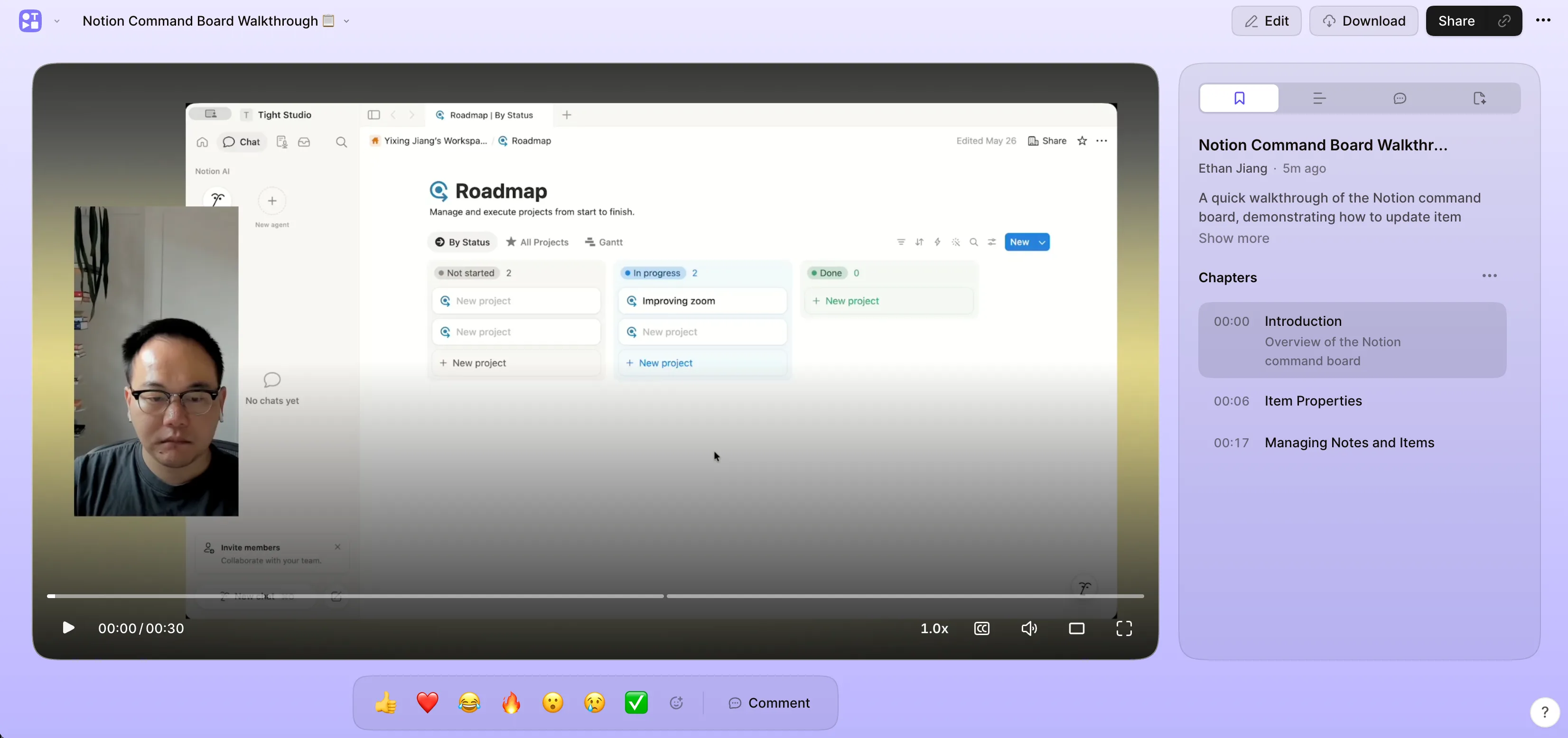
Tella: the hosted view page combines playback, chapters, transcript access, feedback, and document tools around one persistent share link.
Pros
Provides a shareable view page without a separate MP4 export, and later edits update the video behind the existing link.
Adds AI-generated or manually edited chapters that viewers can use to jump between sections.
Makes the transcript available to viewers and supports timestamped emoji reactions and comments.
Can turn the video into written documentation or a summary, then copy, download, save to Notion, or create a Linear issue from the result.
Cons
Playback, transcription, and viewer tools depend on Tella's hosted cloud workflow.
Chapters, transcript, and generated documents still need cloud processing, even though the creator does not start a separate video export.
The interactive viewer tools are most useful when recipients watch on Tella's view page rather than from a downloaded file.
The core difference
Local video creation versus branded cloud delivery
Tella combines one-click recording cleanup with browser and desktop capture, an immediately shareable hosted video, chapters, viewer transcripts, reactions, comments, document generation, branding, custom domains, and analytics. Tight Studio concentrates on local Mac editing and a deeper set of screen-recording presentation tools.
Tella strengths
When should you choose Tella?
You deliver videos as live links
Tella makes the hosted page the deliverable. The video is ready to share without a separate MP4 export, later edits update behind the existing URL, and viewers can use chapters, the transcript, reactions, comments, and AI document generation beside the video.
You want one-click recording cleanup
Tella can find spoken mistakes, trim silent buffers from the start and end, and remove pauses throughout a clip. Natural, Fast, and Faster modes let the creator choose how aggressively silence is cut before reviewing the editable result.
You need branded sharing pages
Tella supports custom domains, logos, and calls to action around hosted videos.
You need viewing analytics
Tella tracks view counts and watch time, while Tight Studio does not list video analytics.
You record in a browser or on Windows
Tella offers a web recorder, Chrome extension, and native Mac and Windows apps. Camera-only, screen-only, and combined capture are available without forcing every project through one recorder.
You want broader visual styling
Tella combines image, animated, color, gradient, uploaded, workspace, and Unsplash backgrounds with a distinctive border system for the screen and camera layers.
You frequently reuse existing clips
Tella's Add clip menu can search personal and workspace clips or videos by title or transcript, then add and rearrange the selected result inside the current video.
You want automated layout changes
Tella supports multiple layouts inside one clip, smooth animated transitions between them, reusable custom layouts, and AI-powered Auto Layouts that generates an editable layout sequence from a chosen template.
You want automatic microphone cleanup
Tella Studio Voice removes background noise, boosts speech volume, and gives microphone audio a more consistent finish. Tight Studio provides direct microphone volume and mute controls, but no equivalent automatic cleanup.
Tight Studio strengths
When should you choose Tight Studio?
You prefer local editing
Tight Studio processes video on the Mac rather than relying on cloud-based processing.
You want a clearer, smoother cursor
Tight Studio smooths cursor movement and provides post-recording cursor size, preset design, custom upload, and hide-when-idle controls. In the Tella editor we tested, we found no comparable cursor styling or path-smoothing panel.
You need standalone shape annotations
Both products support timed text, image and video media, highlights, and privacy blur. Tight Studio also provides arrows, lines, rectangles, and ellipses, plus custom-image replacement for privacy masks. We found no comparable standalone shape tools in Tella's current Overlay panel.
You need precise music timing
Tight Studio can place and trim multiple music segments on selected timeline ranges. Tella supports built-in and uploaded music, but one background track applies across the whole video.
You want editable AI narration
Tight Studio generates narration from an editable script, offers a searchable library of premade voices, and supports personal voice cloning. Tella Studio Voice enhances microphone audio that was already recorded, but it does not generate speech from text or clone a voice.
You record iPhone or iPad demos
Tight Studio records a connected iPhone or iPad directly into the editor. Tella can record a QuickTime window displaying the device or edit a recording uploaded from the device, but it does not provide a native connected-device capture mode.
What both do well
The table does not need to repeat the basics
Both products already cover the foundation of a polished Mac screen recorder. The comparison below focuses on the differences that can actually change your choice.
Multi-clip recording, video uploads, and individual retakes
Native camera-only, screen-only, and combined recording modes on Mac
Editing for mobile screen recordings imported as video clips
Editable captions, backgrounds, layouts, and built-in or uploaded music
Timed text, media, highlight, and privacy-blur overlays
Imported video clips and AI-generated images
Browser-playable share links with reusable URLs
Decisive differences
The differences that can change your decision
Both products cover the recording and editing basics. This table focuses on the workflow, motion, platform, and delivery differences that can change your choice.
Feature
Tight Studio
Tella
Automatic zoom after recording
YesApplied from captured click and cursor data
PartialOpen Zoom and click Generate zooms
Manual zoom target and scale
YesEditable on the timeline
YesFixed target with scale control
Zoom motion blur control
YesAdjustable per zoom segment
NoNo motion-blur control found
Custom background uploads
YesUpload a brand image
YesPersonal and shared workspace libraries
Animated backgrounds
No
YesBuilt-in looping background library
Built-in photo browsing
No
YesBrowse Unsplash from the editor
Decorative border styles
No
YesCorner shapes, shadows, transparent, and solid borders
Cursor path smoothing
YesRebuilds movement into a steadier animated path
NoNo post-recording smoothing found
Cursor size control
YesAdjustable after recording
NoNo editor control found
Preset cursor designs
YesMultiple visible pointer styles
NoUses the captured cursor
Custom cursor image
YesUpload a branded pointer
NoNo upload control found
Hide cursor when idle
YesOptional post-recording behavior
NoNo editor control found
Timed text overlays
YesAnimated text with custom styling
YesFont, color, size, position, alignment, timing, transitions, and custom fonts
Highlight overlays
YesDim surrounding interface areas
YesTimed masks with Hard cut or Smooth transitions
Privacy blur overlays
YesMultiple blur strengths or custom-image replacement
YesTimed and resizable blur masks
Standalone shape annotations
YesArrows, lines, rectangles, and ellipses
NoNo shape tool found in the Overlay panel
Video editor
YesZoom, captions, overlays, music, and clips
YesTimeline and transcript editing, mistake detection, silence/filler removal, Auto Layouts, blur, highlight, and overlays
Multi-clip recording
YesRecord in parts and combine in one local project
YesRecord, upload, reuse, rearrange, and re-record individual clips
Upload video as a clip
YesImport another video into the project
YesUpload a local video from Add clip
Reuse an existing clip
YesImport a clip from another video
YesSearch personal or workspace clips by title or transcript
Mix screen and camera clip types
YesScreen, camera, and combined recording modes
YesCamera-only, screen-only, or both in one video
One-click AI mistake finder
NoNo released editor control in Tight Studio 3.1.5
YesFind and cut spoken mistakes from the Cut panel
One-click buffer removal
NoTrim the start and end manually
YesRemove silent time at the beginning and end
Automatic silence removal
NoNo released bulk-removal panel in the tested editor
YesDetect, count, and remove silent ranges
Silence-removal pacing modes
NoNo comparable released presets
YesNatural, Fast, and Faster
Camera-only recording
YesDedicated native recording mode
YesAvailable in the Mac app and web recorder
Direct iPhone and iPad recording
YesSelect a connected device as the recording source
NoRequires QuickTime window capture or an uploaded device recording
Edit uploaded mobile recordings
YesImport into the local project
YesUpload, trim, crop, zoom, and style
Multiple timed layouts
YesPlace editable layout segments on the timeline
YesAdd multiple layouts inside one clip
Smooth transitions between layouts
NoLayout segments change without an animated transition
YesSmooth by default, with an optional hard cut
AI-generated layout sequence
NoLayouts are placed manually
YesAuto Layouts generates editable layouts and transitions on paid plans
Automatic captions after recording
YesGenerated from the recorded microphone
YesGenerated automatically when video processing finishes
Per-word caption synchronization
YesIndividual word timestamps can be corrected
YesClick-to-word navigation and current-word playback feedback
YesTimestamped inline editing plus find and replace
Professional styled captions
YesBroad preset library and detailed custom styling
YesBuilt-in styles with appearance customization
AI narration / voiceover
YesGenerate narration from an editable script
NoStudio Voice enhances recorded speech instead
Personal voice cloning
YesClone and use your own voice
NoNo voice-cloning workflow found
Media overlays
YesAdd images and media on top of your recording
YesPlace image and video clips on the canvas
Built-in background music
YesCurated music library included
YesBuilt-in track library
Upload custom background music
YesAdd an external music file
YesUpload one whole-video background track
Timed music segments
YesPlace and trim multiple music segments on chosen ranges
NoOne background track applies to the whole video
Direct microphone volume control
YesMute or adjust the recorded microphone
YesAdjust globally or for an individual clip
Automatic microphone cleanup
NoNo automatic noise-removal control
YesStudio Voice removes noise and enhances speech
AI media generation
YesGenerate images on demand
YesGenerate images from the media library
Desktop-native app
YesFull macOS app
YesNative Mac and Windows apps
Local video processing
YesVideos stay on your Mac
NoCloud-based processing
Ongoing free tier
YesStandard exports without a watermark; Add Clip and AI trial limits apply
NoThe earlier free plan was removed; new accounts receive a 7-day Pro trial
Shareable video links
YesAvailable after rendering and upload
YesHosted view page without a separate MP4 export
Hosted playback updates without another render
NoEdits require another render and upload
YesEdits update the video behind the existing link
Viewer chapters
NoNot available on the hosted page
YesAI-generated or manual, with titles and descriptions
Viewer transcript
NoNot available on the hosted page
YesAccessible beside the video
Viewer reactions and comments
NoNot available on the hosted page
YesTimestamped emoji reactions and threaded comments
Generate a document from the video
NoNo viewer-side document generator
YesCreate summaries or documentation from the view page
Browser-based recording
No
YesRecord from Chrome, no install needed
Branded sharing pages
No
YesCustom domains, logos, CTAs
Video analytics
No
YesView counts, watch time
Your questions, answered
What is the practical difference?
Choose based on the work you need to finish, not the longest feature list.
Workflow
Tella connects browser and desktop capture to cloud editing and a persistent hosted page. Tight Studio uses a desktop-native, local editing flow with optional browser sharing after the current edit is rendered and uploaded.
Hosted delivery and viewer experience
Both products create browser-playable share links and can preserve a URL when the video changes. Tella makes the hosted page available without a separate MP4 export and layers chapters, viewer transcript access, timestamped reactions and comments, analytics, and AI document generation around the player. Tight Studio renders and uploads each edited version before it appears at the share URL, and its hosted page focuses on playback, access control, and embeds rather than an interactive content sidebar.
Automatic cutting and cleanup
Tella groups three time-saving actions in its Cut panel: Find mistakes, Remove buffers, and Remove silences. It shows estimated time savings, offers Natural, Fast, and Faster silence modes, and converts the detected ranges into cuts that can be adjusted or reset. Tight Studio 3.1.5 provides manual timeline selection, splitting, deletion, and trimming, but its released editor does not expose a comparable one-click cleanup panel.
Recording modes and availability
Both products record camera-only, screen-only, or combined screen-and-camera clips on Mac. Tella also provides a browser recorder, native Windows app, and Chrome extension, making it easier to start without a particular desktop setup. Tight Studio is limited to Apple Silicon Macs but keeps capture, editing, preview, and rendering inside one native local application. It also records a connected iPhone or iPad directly, while Tella requires QuickTime window capture or an uploaded device recording.
Finished video quality
Both support editable automatic and manual zoom, multi-clip recording, automatically generated captions with word-level synchronization, timed text and media overlays, highlights, privacy blur, AI-generated images, music, and meaningful post-capture editing. Tella generates zooms after the user chooses a style and clicks Generate zooms. In our test, the result drifted more than necessary and Tella exposed no motion-blur control. Tight Studio applies automatic zoom after recording and adds detailed motion controls, cursor smoothing, AI narration and voice cloning, direct iPhone and iPad capture, standalone shape annotations, custom-image privacy masks, and editable source timing for individual caption words. Tella adds click-to-word transcript navigation, find and replace, mistake detection, silence and filler removal, Auto Layouts, chapters, comments, reactions, and document generation.
Backgrounds and borders
Both products support image, color, gradient, and uploaded backgrounds. Tella offers the broader aesthetic toolset with animated backgrounds, Unsplash browsing, personal and workspace libraries, and decorative border styles with multiple corner shapes. Tight Studio provides preset wallpapers, gradients, colors, brand images, random selection, and direct padding controls, but no comparable animated-background or border library.
Cursor treatment
Tella records mouse movement and clicks for Auto Zoom and offers cursor preferences before recording on Mac. In our editor test, it did not provide post-recording controls for cursor size, cursor replacement, idle hiding, or path smoothing. Tight Studio smooths the recorded pointer path and lets users resize it, select a preset design, or upload a custom cursor image.
Overlays and annotations
Tella offers a strong overlay workflow with text, image and video media, highlights, and privacy blur. Media can be positioned, rotated, resized, layered, timed, and faded, while highlight and blur masks support precise timing and smooth transitions. Tight Studio covers those core needs and adds standalone arrows, lines, rectangles, and ellipses, plus custom-image replacement for privacy masks.
Multi-clip assembly
Both products treat multiple takes and imported video clips as a natural part of the project. Tella's Add clip menu records a new clip, uploads a local video, or searches personal and workspace clips by title or transcript. Tight Studio records and imports clips inside a local project, then also keeps photos and videos available as independent timed media layers. Tella has the stronger library-reuse workflow; Tight Studio has the stronger local layered-media workflow.
Layouts and transitions
Both products offer multiple camera and screen layouts with timeline-based changes. Tella automatically adds a smooth transition between layout segments, supports an optional hard cut and three animation styles, and can use Auto Layouts to generate an editable layout sequence with AI. Tight Studio offers a broad manually timed layout library, but it does not currently animate between layout segments or generate layout changes automatically.
Music and microphone
Both products provide built-in music, custom music uploads, soundtrack volume, and microphone-level controls. Tella adds Studio Voice for automatic background-noise removal and speech enhancement. Tight Studio instead provides more precise soundtrack timing through multiple music segments that can be placed and trimmed on selected timeline ranges; Tella uses one whole-video background track.
Captions and transcript editing
Both products generate captions after recording, preserve word-level synchronization, provide built-in caption styles, and make transcript text easy to correct. Tella adds click-to-word navigation and find and replace. Tight Studio keeps the script beside synchronized timeline segments and supports correcting the source timing of an individual caption word.
AI voice narration
Tight Studio can turn edited script text into narration with premade voices or a cloned personal voice. Tella Studio Voice uses AI for noise removal, volume enhancement, and speech consistency, but its current editor and documented feature set do not include text-to-speech narration or voice cloning.
iPhone and iPad recording
Tight Studio exposes a connected iPhone or iPad as a direct recording source and keeps mobile takes in the same multi-clip project. Tella documents two workarounds: record the QuickTime window showing a wired device, or record on the device and upload the file. Both can edit the resulting mobile video, but only Tight Studio provides the direct capture workflow.
Privacy and storage
Tella uses cloud processing and built-in hosting. Tight Studio processes locally, and video leaves the Mac only when the creator chooses to share it.
Pricing and ownership cost
Tight Studio has an ongoing free tier with standard exports and paid plans from $9 per month billed yearly. Tella briefly introduced a free plan earlier in 2026, then removed it. New Tella accounts now receive a seven-day Pro trial before paid access starts at $13 per user per month billed yearly.
Pricing
Current plans and practical limits
$0 / month
Standard exports have no watermark. Free includes five Add Clip trial uses, up to five seven-day share links, and 100 trial AI credits; trial AI Voice exports are watermarked.
Tight Studio has an ongoing free tier and paid plans from $9 per month billed yearly. Tella removed its earlier free plan and now offers a seven-day Pro trial before paid access starts at $13 per user per month billed yearly.
Tight Studio
Free$0No watermark on standard exports; 5 Add Clip trial uses, up to 5 shareable links with 7-day expiration, and 100 trial AI credits
Plus$9/moBilled yearly, or $19/mo monthly. Unlimited multi-clip recording and unlimited non-expiring shareable links
Pro$24/moBilled yearly, or $49/mo monthly. 1,000 AI credits/mo plus team workspace and collaborative editing
Tella
7-day trial$0Full Pro trial for new accounts; no ongoing free plan after the trial ends
Premium$19/moPer user, billed yearly; monthly billing costs more
Using both products
Can you use both?
Yes. You could make and export a polished video in Tight Studio, then upload it to Tella when you need its persistent hosted page, chapters, transcript, comments, document generation, branding, custom domain, or analytics. This depends on a normal video upload, not a verified integration.
How we checked the facts
Reviewed against current public product information
This is a first-party comparison written and reviewed by the Tight Studio team. We reviewed it on August 21, 2026 using official product documentation, pricing pages, and the current Tight Studio pricing and feature pages. Feature availability can depend on plan, platform, or workflow, so the table uses notes and “Partial” where a simple yes/no would be misleading.
“Tight Studio combines simplicity with impact. It's effortless to use, yet the videos I create in minutes consistently help attract new users to our latest product features.”
“I've been using Tight Studio recently to prep presentations and share demos with my colleagues, and it's been a huge time saver. The whole flow feels really smooth, even for someone with no video editing skills. I can go from recording to a clean, shareable product demo in minutes with almost no effort.”
“Awesome tool - I've used it to seamlessly edit my video recordings to show it to peers and for presentations and guides for software usage! Setup is super easy, and I LOVE the auto-zoom feature. Crazy how fast the team is shipping too.”
Choose Tella when one-click mistake, buffer, and silence cleanup, immediate hosted delivery, chapters, viewer transcripts, reactions, comments, document generation, browser or Windows recording, AI-generated layouts, smooth layout transitions, Studio Voice microphone cleanup, searchable clip-library reuse, broad visual styling, branded hosting, and analytics define the workflow. Choose Tight Studio when an end-to-end native local Mac workflow, smoother zoom and cursor motion, AI narration, personal voice cloning, direct iPhone or iPad capture, precise timeline music segments, standalone shape annotations, custom-image privacy masks, and deeper control over the finished screen video are more important. Both support camera-only recording, browser-playable share links, and editing of uploaded mobile footage.
FAQ
Frequently asked questions
Is Tight Studio a good alternative to Tella?
Yes. Both tools offer editable zooms, multi-clip projects, captions, timed text and media overlays, privacy blur, highlights, AI-generated images, built-in or uploaded music, and shareable video pages. Tella also provides one-click mistake finding, buffer trimming, silence removal, Studio Voice microphone cleanup, transcript editing, Auto Layouts, instant hosted playback, viewer chapters and transcripts, reactions, comments, document generation, and branded hosted pages. Tight Studio adds an ongoing free tier, smoother automatic zoom motion with motion-blur controls, cursor smoothing, AI narration and voice cloning, direct iPhone and iPad capture, standalone shape annotations, custom-image privacy masks, local editing, and a Mac team workspace.
Is Tight Studio free?
Free includes standard exports without a watermark, five account-level Add Clip trial uses, up to five shareable links with seven-day expiration, and 100 trial AI credits. AI Voice exports use a watermark during the trial.
Is Tella free?
Tella no longer has an ongoing free plan. It briefly offered one earlier in 2026, then removed it. New accounts now receive a seven-day trial of the full Pro plan without a credit card. After the trial, Tella starts at $13 per user per month when billed yearly.
Can Tight Studio create shareable video links like Tella?
Yes. Tight Studio can render and upload the edited project from the app, then give viewers a browser-playable link without a download. Re-sharing can preserve the same URL. Tella has the stronger hosted workflow because the edited video is available behind its share link without a separate MP4 export, and the view page adds chapters, a viewer transcript, reactions, comments, analytics, and document generation.
Does Tella require an export before sharing an edited video?
No separate MP4 export is required. Tella keeps the video hosted and lets creators share the view-page URL as soon as recording or editing is complete. Later edits update the video behind the existing link. Transcription, chapters, and document generation still use cloud processing, but the creator does not need to render, download, and upload a new video file before sharing the latest cut.
Does Tight Studio work on Windows?
Currently, Tight Studio is available for macOS with Apple Silicon only. Tella has native apps for both Mac and Windows. If you need Windows support, email ethan@tight.studio and we will prioritize accordingly.
How does auto zoom compare in Tight Studio and Tella?
Both apps keep zooms editable after recording and support manual targets. Tight Studio applies automatic zooms after recording and exposes animation duration, style, motion blur, and camera-size controls. Tella asks you to choose Adaptive, Subtle, Moderate, or Intense and click Generate zooms. In our test, Tella added more unnecessary drift and had no motion-blur control, so Tight Studio produced smoother motion with less cleanup.
Which has better background customization, Tight Studio or Tella?
Tella offers the broader visual styling system. Both products support preset backgrounds, solid colors, gradients, and custom image uploads. Tella adds animated backgrounds, Unsplash browsing, shared workspace background libraries, and decorative border styles with multiple corner shapes. Its current editor applies background, shape, and border styling across the whole video by default, with an option to scope a change to one clip. Tight Studio keeps the workflow simpler and provides direct padding controls, but it does not offer Tella's animated backgrounds or border treatments.
Can Tella change or smooth the cursor after recording?
Not in the current editor we tested. Tella captures mouse movement and clicks for its Auto Zoom feature, and its Mac recorder has cursor preferences before capture. We found no post-recording controls for cursor size, cursor image replacement, hide-when-idle behavior, or path smoothing. Tight Studio smooths the cursor path and lets you resize the cursor, choose a preset design, or upload a custom pointer image.
Does Tella support text, media, highlight, and shape overlays?
Tella supports a strong core overlay workflow: timed text, image and video media, highlight masks, and privacy blur. Media overlays can be positioned, rotated, resized, layered, timed, and faded, while highlights and blurs can use precise timing and smooth transitions. In the current editor we tested, Tella did not provide standalone arrows, lines, rectangles, or ellipses. Tight Studio includes those shape annotations and also lets a privacy mask replace sensitive content with a custom image.
Can Tella combine multiple recordings or imported clips?
Yes. Multi-clip recording is a core Tella workflow. The Add clip menu can record a new clip, upload a local video, or select an existing personal or workspace clip. Existing clips can be searched by title or transcript, renamed, rearranged, duplicated, or re-recorded individually. Tight Studio provides the same core record-and-import workflow locally, while also keeping imported photos and videos available as independent timed media layers.
Can Tella automatically remove mistakes, buffers, and silences?
Yes. Tella's Cut panel can find spoken mistakes, remove silent buffers at the start and end, and detect silent ranges throughout a clip. The silence tool reports how many pauses it found and the estimated time saved, then offers Natural, Fast, and Faster modes before applying editable timeline cuts. Tight Studio 3.1.5 supports manual timeline cutting, but the released editor we tested does not expose a comparable one-click cleanup panel.
Can Tight Studio and Tella record camera-only video?
Yes. Both products can record the camera and microphone without capturing the screen, then edit that take alongside screen recordings. Tight Studio provides a dedicated Camera Only mode inside its native Apple Silicon Mac app and keeps editing local. Tella supports camera-only capture through both its native Mac app and browser recorder, and also provides native Windows and Chrome-extension recording. Tella therefore offers more ways to start a recording, while Tight Studio keeps the full workflow inside one native local Mac application.
Can Tella record an iPhone or iPad directly?
Not through a native connected-device mode. Tella documents two workarounds: display the connected device in QuickTime and record the QuickTime window, or record on the iPhone or iPad and upload the file afterward. Tight Studio lets you select a connected iPhone or iPad directly as the recording source, then edit the capture with the same clips, zooms, backgrounds, captions, masks, and annotations used for desktop recordings.
Which has better layouts and layout transitions, Tight Studio or Tella?
Tella has the stronger layout workflow. Both products provide multiple camera and screen arrangements and let users change layouts over time. Tella automatically adds smooth transitions between layout segments, offers an optional hard cut, and provides Gentle, Moderate, and Snappy animation styles. Its paid Auto Layouts feature can also use AI to generate an editable sequence of layouts and transitions. Tight Studio provides a broad set of manually timed layouts, but it does not currently animate between layout segments or generate them with AI.
Which has better music and microphone controls, Tight Studio or Tella?
The answer depends on the audio task. Both products include background music, custom music uploads, and microphone volume controls. Tella has the clear advantage for microphone cleanup: Studio Voice removes background noise, boosts speech volume, and improves consistency. Tight Studio has the advantage for soundtrack timing because it can place and trim multiple music segments on selected timeline ranges; Tella applies one background-music track across the whole video.
How do captions compare in Tight Studio and Tella?
Both products generate captions after recording, preserve word-level synchronization, provide polished built-in styles, and include a readable text editor. Tella offers click-to-word transcript navigation, timestamped inline subtitle correction, and find and replace. Tight Studio keeps its script beside synchronized timeline segments and also supports correcting the source timing of an individual caption word. Neither product offers an offline local transcription model in this comparison.
Does Tella support AI voice narration or voice cloning?
No comparable feature is available in Tella's current editor or documented feature set. Tella Studio Voice enhances a microphone recording by removing noise, boosting volume, and improving consistency, but it does not create speech from text or clone the speaker's voice. Tight Studio can generate narration from an editable script, use premade voices, and clone a personal voice on its Pro plan.
Does Tight Studio have AI features?
Yes. Tight Studio includes AI narration with premade voices and personal voice cloning, AI-powered captions, and AI media generation. These features can replace another recording pass when a spoken line or supporting visual needs to change.
Want to try Tight Studio?
Download Tight Studio for smoother automatic zoom, AI narration, direct iPhone and iPad capture, local Mac editing, and a free starting tier.