Screen Studio set the standard for Mac screen recordings that automatically zoom into clicks, smooth the cursor, and frame the screen against a polished background. It still does that job well. In our August 2026 test, its automatic zoom quality was among the best we reviewed, and its selected-app audio capture, on-device transcription, microphone cleanup, and Intel Mac support remain meaningful advantages.
It is not the only app that can produce that look anymore. Screen Studio is macOS-only, its trial cannot export, and its official price was $29 per month or $9 per month billed yearly when we checked on August 21, 2026. Several alternatives now match the core automatic-zoom workflow while offering a free finished export, Windows support, one-time pricing, deeper editing, open-source code, or AI narration.
We tested ten Screen Studio alternatives for this guide. We make Tight Studio, so this is a first-party comparison. To keep the recommendations useful, we link the full test behind each conclusion and call out where Screen Studio still wins.
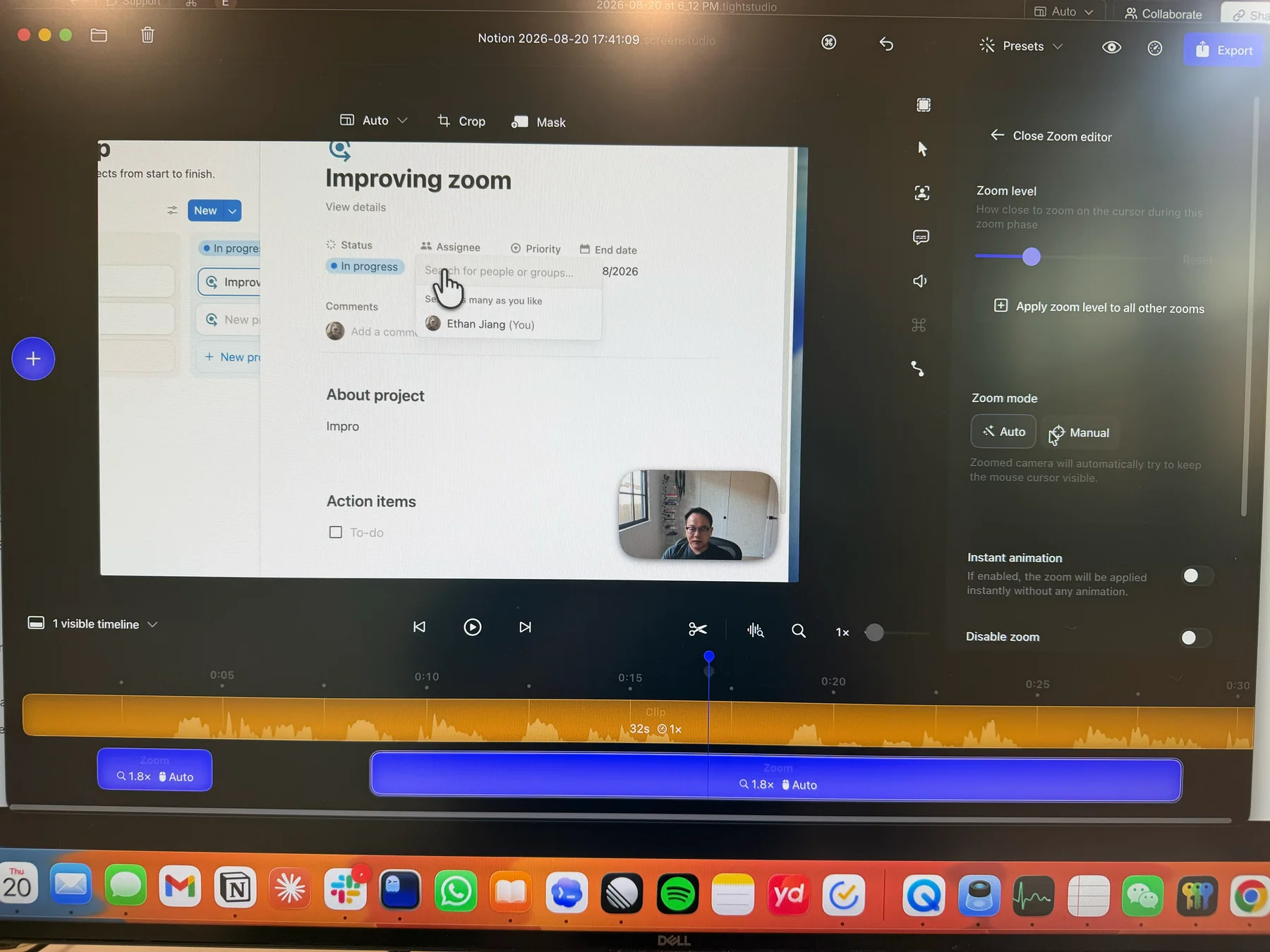
Screen Studio 3.7.5: an automatic zoom segment opened in the editor during our August 2026 test. Screen Studio blocks direct screenshots of its editor, so this image is a phone photo.
How we tested these Screen Studio alternatives
Ethan tested the apps between August 20 and 21, 2026, primarily on an M1 MacBook Air with 16 GB of memory running macOS 26.3. Where products had overlapping editing workflows, we used the same roughly 31-second Notion walkthrough so zooms, cursor motion, backgrounds, captions, camera layouts, and exports could be compared against the same source material.
The tested builds and review scope were:
- Tight Studio 3.1.5 and Screen Studio 3.7.5 on August 20, using the same 30.8-second walkthrough.
- Screen Charm 1.9.5 on August 21, using the same Notion actions in a fresh recording.
- FocuSee on August 20, reviewing the editor, 2D Zoom, 3D Motion, backgrounds, captions, camera, audio, overlays, AI, and device-capture controls.
- Cap 0.5.9 on August 21, using a 26.4-second Notion walkthrough in Studio Mode.
- Camtasia Editor 2026.0.7 on August 20, using the same 30.8-second walkthrough.
- CleanShot X on August 20, testing its Record Screen flow and checking its official video feature and pricing pages.
- OBS Studio 32.0.1 on August 20, recording a 1920x1080 screen-and-webcam scene for 30 seconds at 30 fps. We also checked current 32.2 feature availability against OBS documentation.
- Loom on August 20, testing its Mac recorder, instant share page, timeline and transcript editing, overlays, captions, camera layouts, audio controls, AI tools, multi-video stitching, mobile support, and exports.
- Recordly on August 21, using the same Notion walkthrough to test automatic zoom, cursor controls, backgrounds, captions, annotations, audio, multi-clip editing, imports, and export performance.
- Tella on August 21, using the same Notion walkthrough to test generated and manual zooms, multi-clip editing, automatic cleanup, backgrounds, overlays, layouts, captions, audio, hosted sharing, and recording modes.
Pricing and plan limits were rechecked on official product pages on August 21. Motion comfort and interface simplicity are subjective, so we identify those observations as test findings rather than universal facts. Screen Studio, Screen Charm, and FocuSee block direct editor screenshots; their interface images were photographed with a phone, so sharpness and color differences do not represent export quality.
Screen Studio alternatives compared
| Tool | Platforms | Price checked August 2026 | Automatic zoom | Free finished export | Main tradeoff |
|---|---|---|---|---|---|
| Tight Studio | Apple Silicon Mac | Free; Plus $9/mo yearly; Pro $24/mo yearly | Yes | Yes, standard export | No per-app audio filtering or Intel/Windows app |
| FocuSee | Mac, Windows | One free watermarked export; from $49.99/yr | Yes, plus 3D Motion | Watermarked | No same-project multi-clip assembly in our test |
| Screen Charm | Apple Silicon Mac | $79 once | Yes | No, export is locked in trial | Focused editor with no captions or media imports |
| Cap | Mac, Windows | Free for personal use; commercial license $29/yr | Yes, in Studio Mode | Yes for personal use | Commercial use requires a license; no AI narration |
| Camtasia | Mac, Windows | Free watermarked; watermark-free from $179.88/yr | Yes, SmartFocus | Watermarked | Deepest editor and steepest learning curve in this list |
| CleanShot X | Mac | $29 once | No | No free trial | Excellent capture utility, very limited video post-production |
| OBS Studio | Mac, Windows, Linux | Free and open source | No | Yes | No built-in post-capture editor |
| Loom | Mac, Windows, browser, iOS, Android | Free Starter; Business $18/user/mo monthly | No | Limited Starter plan | No editable zoom, cursor, or camera composition after capture |
| Recordly | Mac, Windows, Linux | Free and open source | Yes | Yes | Project continuity is uncertain; key audio and multi-clip tools were missing in our test |
| Tella | Mac, Windows, browser | 7-day trial; Pro $13/mo billed yearly | Yes | Trial only | Cloud workflow with no ongoing free plan |
There is no universal winner. Tight Studio, FocuSee, Screen Charm, Cap, Recordly, and Tella are the closest replacements for Screen Studio’s automatic polish. Camtasia is a much larger editor, Loom prioritizes fast team sharing, and CleanShot X and OBS solve narrower capture and live-production jobs.
1. Tight Studio - the broadest direct Screen Studio alternative
Tight Studio is our app, so treat this recommendation as first-party. In the full Tight Studio vs Screen Studio test, automatic zoom quality was a tie. Both apps generated polished zooms after recording, kept automatic and manual zoom segments editable, smoothed cursor motion, added backgrounds, styled captions, music, masks, iPhone capture, local exports, GIFs, and browser share links.
The reason to consider Tight Studio is the surrounding editor. It can record multiple takes into one project, import video and photos as timed media, record camera-only footage, add text and shape annotations, change camera layouts across the timeline, and generate narration from a script. Those are substantial additions when a recording grows beyond one screen capture.
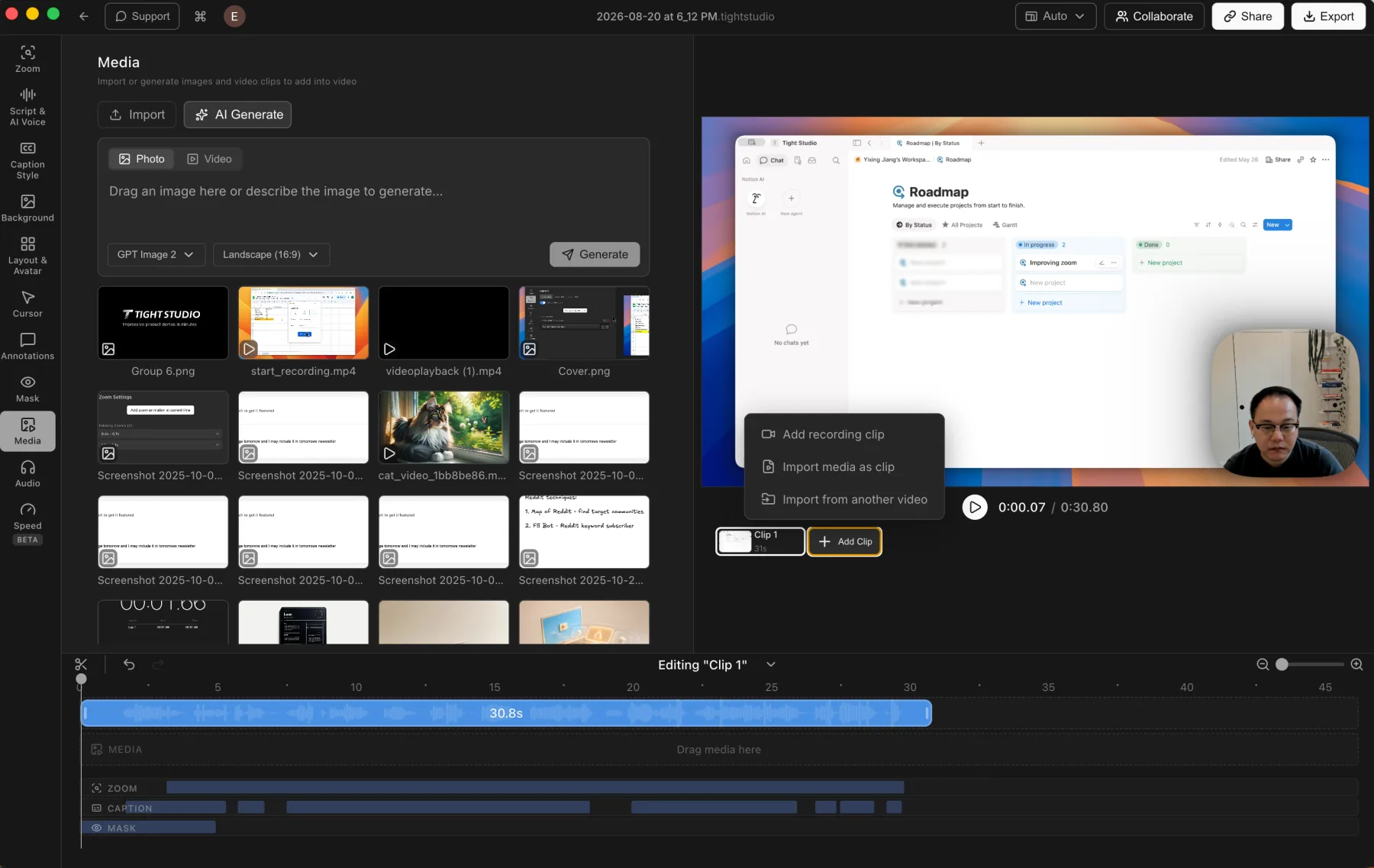
Tight Studio 3.1.5: imported media and additional recording clips stay inside one editable project.
What stood out in testing:
- Automatic and manual zoom were competitive with Screen Studio rather than a compromise.
- The transcript retained word-level timestamps and allowed an individual word’s source timing to be corrected.
- Text, arrows, rectangles, ellipses, lines, highlights, and privacy masks could be timed on the video.
- Standard exports worked on the free tier without a watermark.
- Free also included five account-level Add Clip trial uses, five seven-day share links, and 100 trial AI credits.
Tradeoffs:
- Tight Studio requires an Apple Silicon Mac. Screen Studio supports compatible Intel Macs.
- Tight Studio records system audio and microphone audio as separate tracks with independent volume control. Screen Studio can also capture computer audio and can limit capture to selected apps.
- Tight Studio uses cloud transcription. Screen Studio can transcribe locally on the Mac.
- Screen Studio offers automatic microphone noise reduction and normalization. Tight Studio currently provides volume and mute controls without automatic cleanup.
- Ongoing AI voice generation, personal voice cloning, team workspaces, and collaborative editing require Tight Studio Pro at $24 per month billed yearly.
Tight Studio is the closest overall replacement in this test when Screen Studio-style motion is the baseline and the recording also needs retakes, imported media, annotations, camera-only sections, or script-generated narration.
2. FocuSee - the Screen Studio alternative with 3D motion and Windows support
FocuSee matched the core 2D automatic-zoom workflow in our Tight Studio vs FocuSee comparison. It detected interactions, generated editable zoom segments, and allowed automatic cursor tracking or a manually selected center. It then added something neither Screen Studio nor Tight Studio offers: 3D Motion with perspective, tilt, manual positioning, and intensity presets.
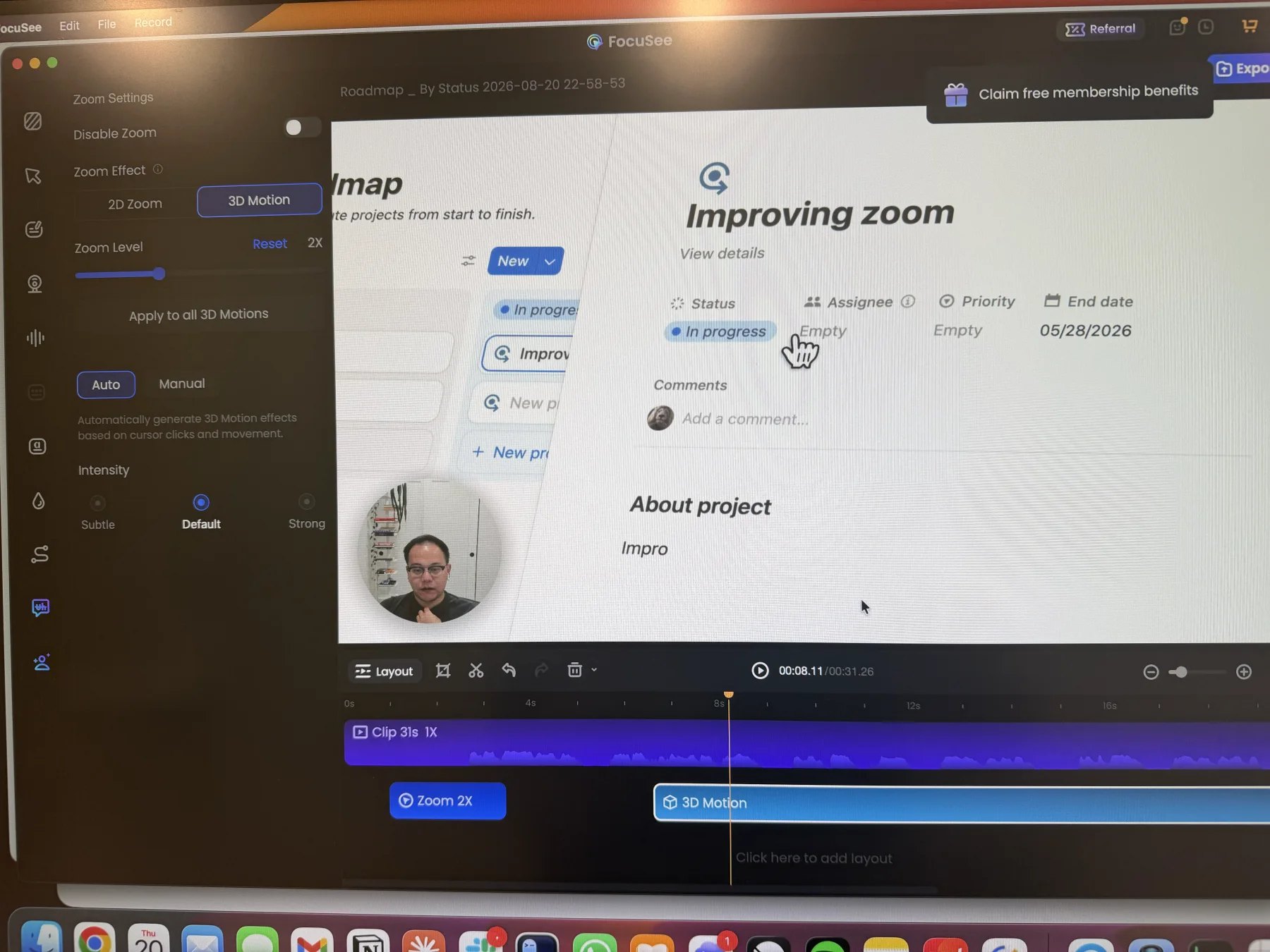
FocuSee: a 3D Motion segment with automatic cursor-based movement and intensity presets.
What stood out in testing:
- The 2D zoom editor covered the expected automatic and manual controls, while 3D Motion offered a distinct visual style.
- FocuSee ran on both macOS and Windows and also supported connected Android devices in addition to iPhone and iPad.
- Its local caption model provided an offline option, while the credit-metered advanced model supported more languages.
- Cursor effects included smoothing, idle hiding, visual click effects, selectable click sounds, and volume control.
- The editor included silence removal, AI microphone cleanup, AI Avatar presenters, blur, spotlight, magnifier, and a large background library.
Tradeoffs:
- The free version allowed one export with a FocuSee watermark and no cloud sharing in the plan we reviewed.
- We could import one MP4 as a new project, but could not append another recording, combine multiple clips, or add photos and videos as timed layers inside the current project.
- 3D perspective can create more movement than a straightforward interface walkthrough needs. Whether it looks better is a style choice.
- FocuSee Standard was $49.99 for the first year with no included AI credits. Advanced was $79.99 for the first year, while the $199.99 lifetime license covered FocuSee 2.x and included credits that expire after one year.
FocuSee is the strongest alternative here when Windows or Android support matters and the extra 3D motion, AI cleanup, or avatar workflow is more valuable than same-project multi-clip editing.
3. Screen Charm - a focused one-time-purchase Screen Studio alternative
Screen Charm took the narrowest approach in our Tight Studio vs Screen Charm test. It recorded the Mac screen, camera, microphone, and system audio, then applied smooth automatic zoom, cursor motion, motion blur, backgrounds, and music. The core result was good, and its $79 lifetime license was much easier to understand than a recurring subscription.
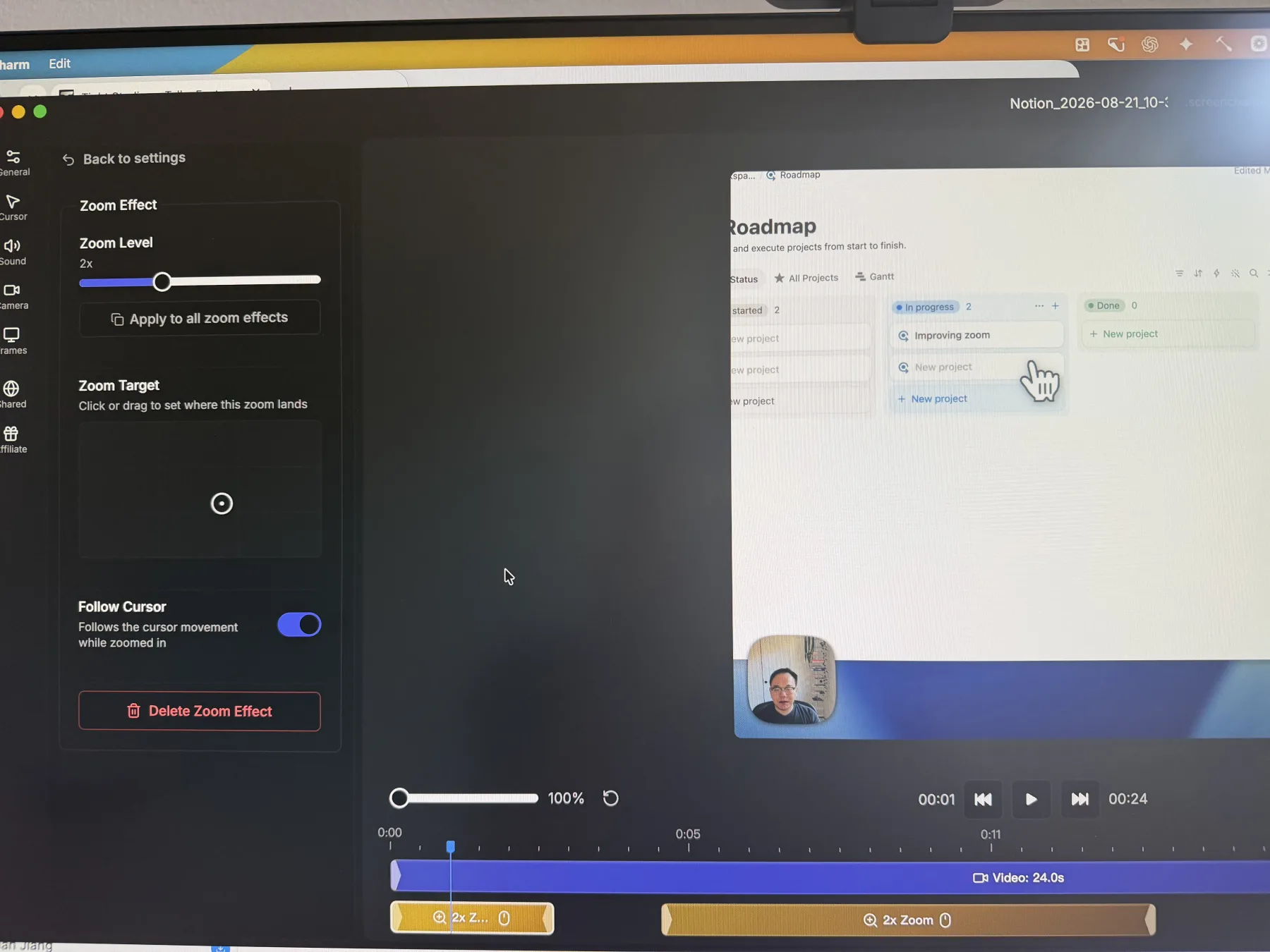
Screen Charm 1.9.5: a 2x automatic zoom with target, follow-cursor, and timeline controls. This is a phone photo because the editor blocks direct screenshots.
What stood out in testing:
- Automatic zoom motion was smooth, with clear per-effect controls for zoom level, landing target, follow-cursor behavior, and timing.
- Built-in click effects, microphone enhancement, system-audio recording, and a MacBook Pro frame covered several useful Screen Studio-style details.
- The one-time $79 license included three Macs, 4K export, share links, and future updates according to Screen Charm’s current pricing page.
Tradeoffs:
- Recording and editing were free to try, but a finished export required the paid license.
- Version 1.9.5 did not provide captions, transcript editing, AI narration, text or shape overlays, privacy masks, imported media, additional clips, or timeline-based camera layout changes.
- We did not find pause, resume, restart, or discard controls after recording began.
- Screen Charm required Apple Silicon and macOS Sonoma 14 or newer.
Screen Charm makes the most sense when the desired result is a clean single-take Mac recording and one-time pricing matters more than captions, broader editing, or recovery controls during capture.
4. Cap - the open-source Screen Studio alternative
Cap spans two workflows. Instant Mode records and shares quickly, while Studio Mode adds the automatic zoom, cursor treatment, backgrounds, captions, camera scenes, and timeline editing that make it a direct Screen Studio alternative. We tested Studio Mode in the Tight Studio vs Cap comparison.
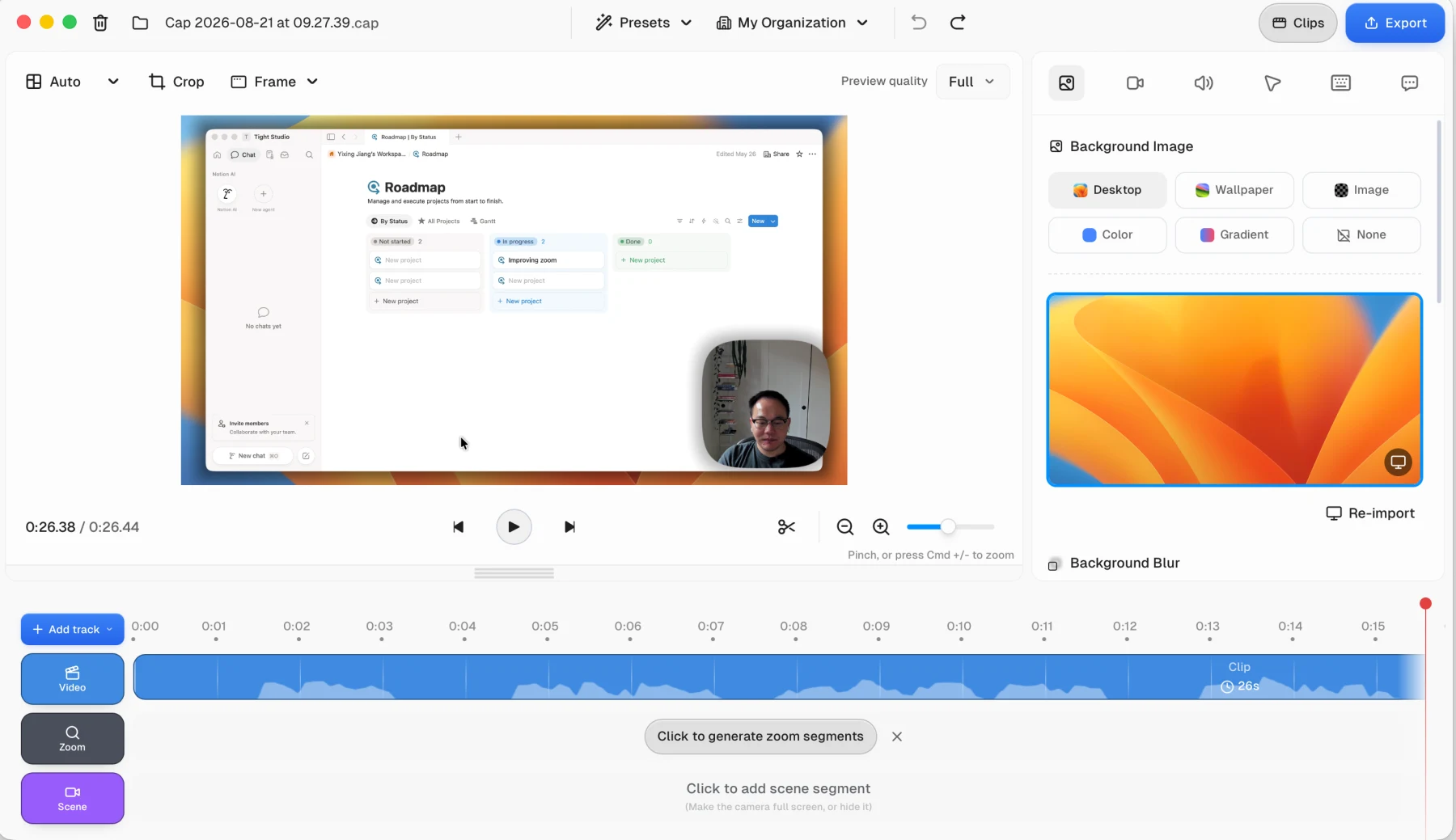
Cap 0.5.9: automatic zoom segments are generated after recording and remain editable on the timeline.
What stood out in testing:
- Cap generated automatic zooms after recording and exposed manual zoom centers and zoom levels.
- Cursor smoothing, idle hiding, movement styles, click effects, backgrounds, locally generated captions, camera Scenes, music uploads, and a conventional timeline created a credible polished-recording workflow.
- Cap worked on Apple Silicon and Intel Macs plus Windows.
- The code was open source, the platform could be self-hosted, and Cap Pro supported custom storage, a custom domain, protected shares, analytics, and team workspaces.
Tradeoffs:
- Zoom center movement felt more abrupt than Tight Studio in our 26.4-second test. That is a subjective result from one recording, not a universal quality judgment.
- The distributed desktop app was free for personal use, but commercial use required Cap’s $29 yearly desktop license or Cap Pro. Self-built source releases follow separate licensing terms.
- We did not find script-generated AI narration, personal voice cloning, direct iPhone or iPad capture, shape annotations, or photos and videos as timed visual overlays in the tested editor.
- Cap Pro was $12 per user monthly or $8.16 per user monthly when billed yearly.
Cap is the closest open-source substitute for Screen Studio and the only option in this list that combines a polished Studio editor with first-party self-hosting and bring-your-own-storage choices.
5. Camtasia - the deepest Screen Studio alternative for full editing
Camtasia was the most feature-rich product in this test. Camtasia Rev offered a guided screen-recording workflow with layouts, backgrounds, camera effects, and filters, while the full Editor opened into a traditional multi-track workspace closer to a general video editor. Its SmartFocus feature generated automatic zoom and pan animations from cursor movement and clicks in Camtasia recordings.
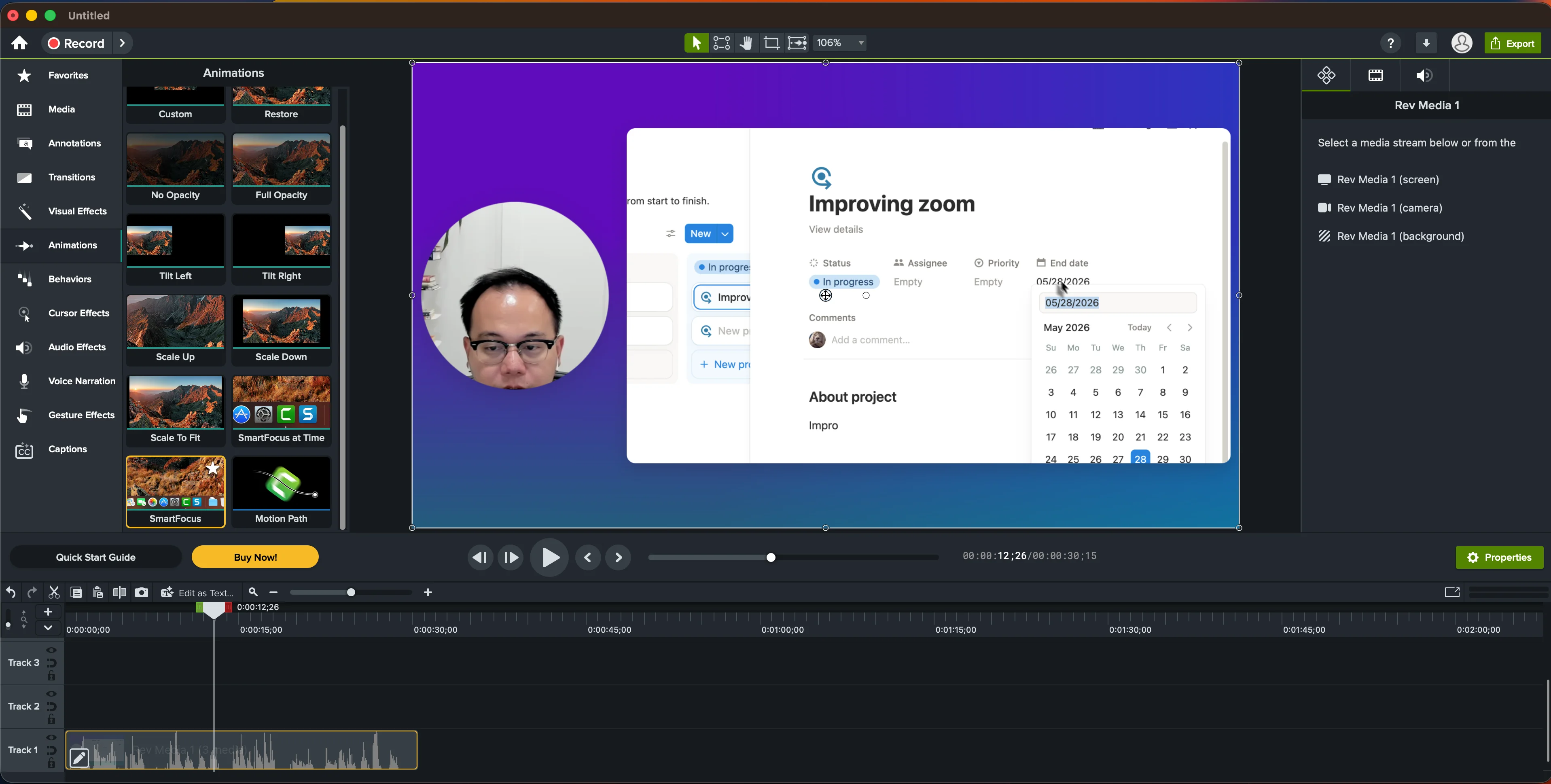
Camtasia Editor 2026.0.7: SmartFocus appears under Animations, while manual framing uses separate animation or Zoom-n-Pan controls.
The Tight Studio vs Camtasia test found a much broader effects library than any focused Screen Studio alternative. Camtasia included detailed cursor paths and click effects, annotations, transitions, animation behaviors, audio effects, multi-track editing, green screen, PowerPoint import, quizzes, SCORM export, iPhone and iPad recording, and device frames.
What stood out in testing:
- SmartFocus handled automatic zoom, while Scale Up, Custom animations, and Zoom-n-Pan provided manual framing.
- Screen, camera, microphone, system audio, and connected iOS devices could be recorded as separate sources.
- Camtasia could combine unrestricted media tracks, apply deep visual and audio effects, and record a separate manual voiceover pass while the timeline played.
- The $249-per-year Create plan added AI script and voice generation through the separately installed Audiate app with more than 200 advertised voices.
Tradeoffs:
- The depth created a substantial discoverability cost. We repeatedly needed TechSmith tutorials to find controls that existed in the product.
- Free Camtasia Editor exports were watermarked. The $39 Starter plan also kept the Editor watermark, while watermark-free editing began with Essentials at $179.88 per year.
- SmartFocus and manual zoom were split across different controls, which made the simple zoom workflow less direct than focused recorders.
- Audiate’s AI voice workflow was not tested hands-on for our comparison because it required a separate installation.
Camtasia is less of a Screen Studio clone and more of a full editor with screen-recording intelligence. The extra complexity earns its place when the project needs unrestricted tracks, training features, or an effects library that a focused recorder does not try to provide.
6. CleanShot X - a screenshot-first Screen Studio alternative
CleanShot X is primarily a Mac capture utility. Its strengths are screenshots, scrolling capture, OCR, quick markup, GIF recording, a compact screen recorder, and fast cloud links. The app cost $29 once with one year of updates and 1 GB of cloud storage when we checked; optional update renewal was $19 per year, and Cloud Pro was $8 per user per month billed annually.
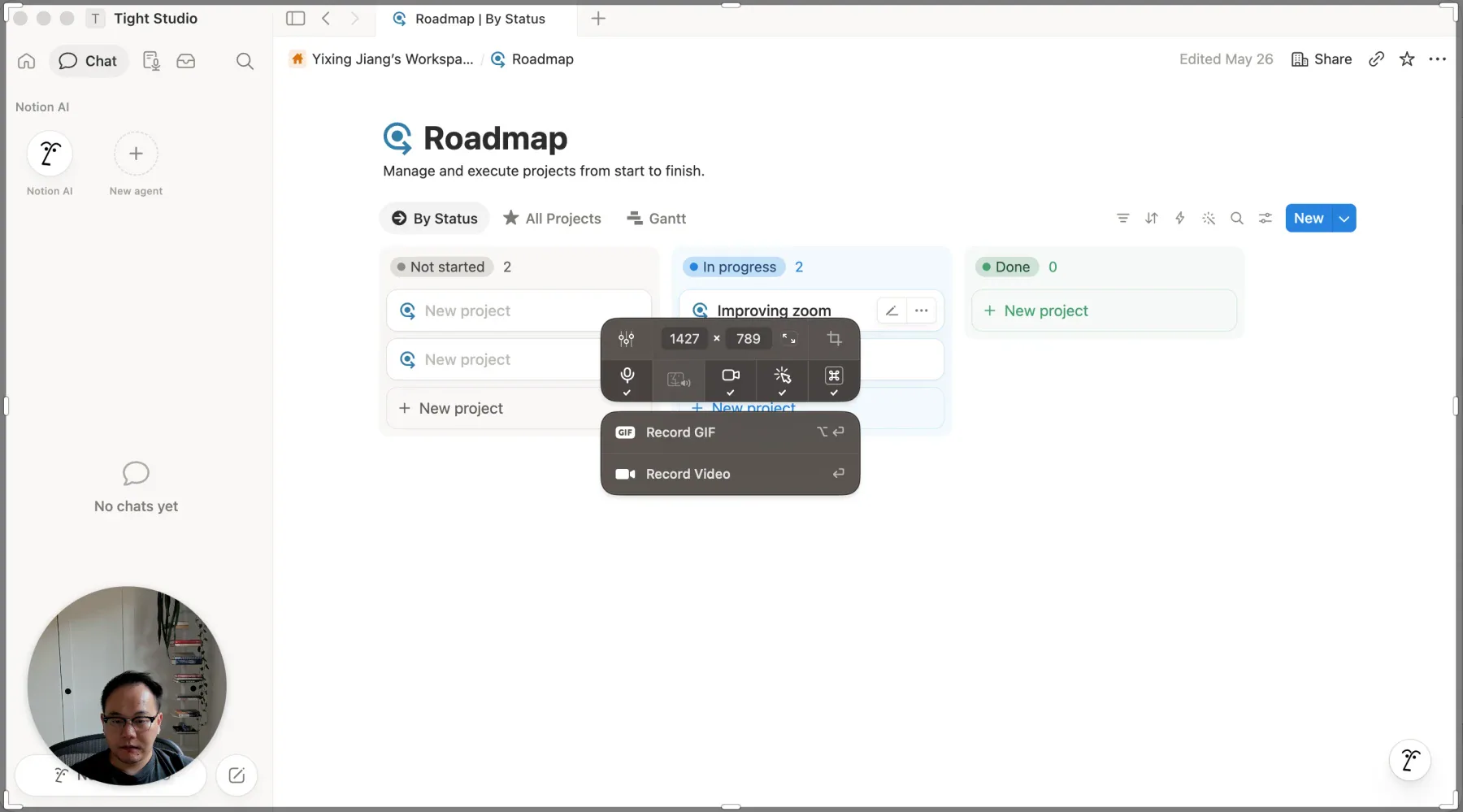
CleanShot X: the Record Screen flow used for our August 2026 comparison review.
In the Tight Studio vs CleanShot X comparison, CleanShot was substantially faster for a quick MP4, GIF, screenshot, or share link. It captured a selected area or window with microphone, computer audio, camera, click markers, and keystrokes. Its video editor then handled trimming, cropping, quality, resolution, audio levels, and export.
Tradeoffs:
- CleanShot X did not provide automatic zoom, manual post-capture zoom keyframes, cursor smoothing after recording, video backgrounds, speech captions, script-generated narration, multiple video clips, or a screen-production timeline.
- Screenshot backgrounds, annotations, and redaction tools did not carry over to the video editor.
- CleanShot did not offer a direct free trial, although its pricing page listed a 30-day money-back guarantee and Setapp availability.
- It was Mac-only.
CleanShot X overlaps with Screen Studio at capture and sharing, then stops much earlier. It is a practical alternative when screenshot work dominates and recorded videos only need lightweight finishing.
7. OBS Studio - the free Screen Studio alternative for live production
OBS Studio is free, open source, and available on Windows, macOS, and Linux. It can combine the screen, cameras, text, images, browser sources, capture cards, media, and detailed audio routing into live scenes, then record or stream the result without watermarks, time limits, or paid tiers.
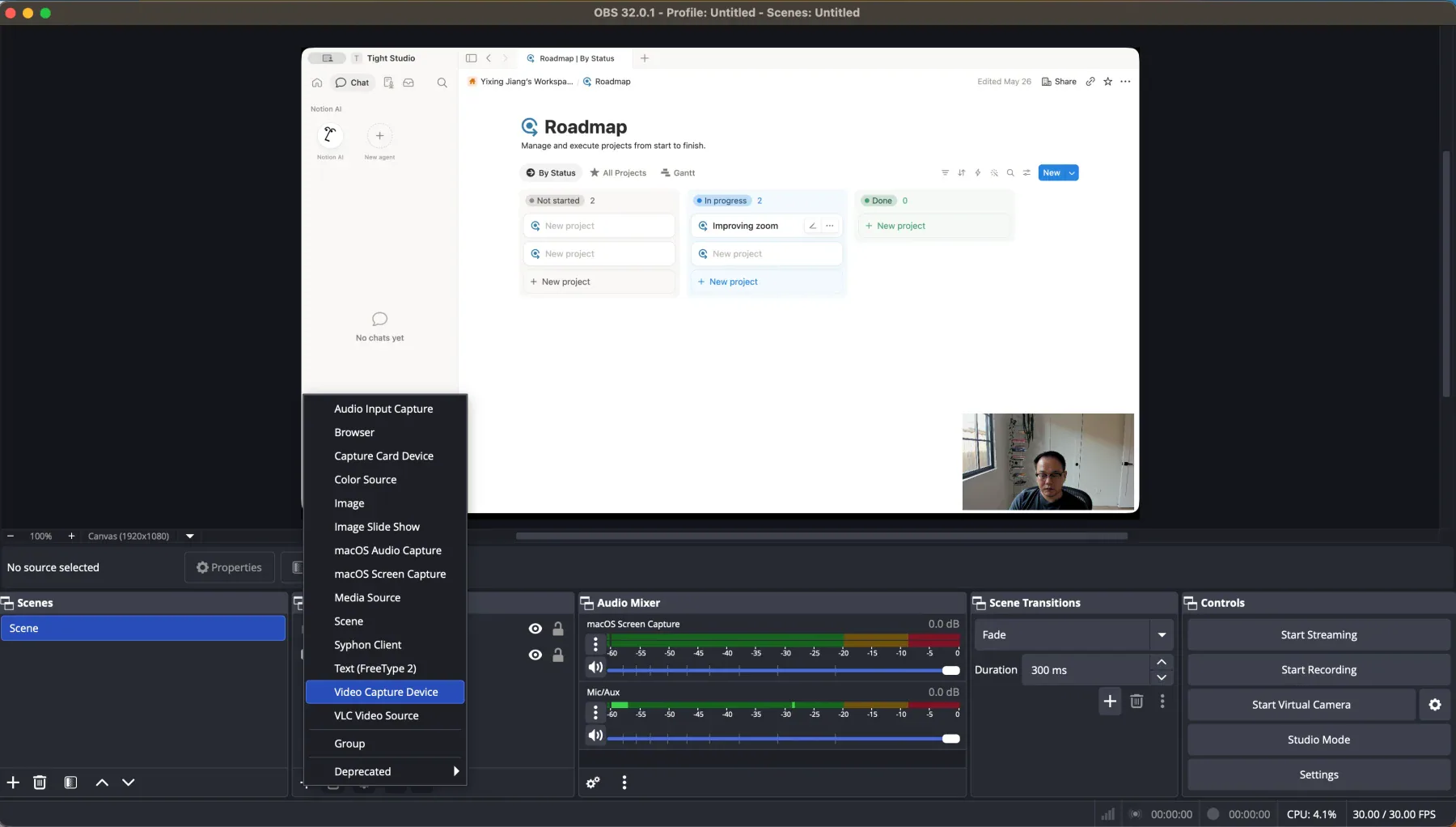
OBS Studio 32.0.1: screen and webcam sources arranged on a 1920x1080 canvas before recording.
Our Tight Studio vs OBS comparison found that OBS was much more powerful before and during capture. Scenes, source transforms, transitions, filters, VST plugins, monitoring, multi-track audio, encoder controls, and a large plugin ecosystem made it the strongest live-production tool in this list.
The tradeoff is timing. OBS composes the result before or during recording and flattens those sources into the captured file. It does not include Screen Studio-style post-capture automatic zoom, cursor reconstruction, transcript editing, styled captions, privacy masks, music placement, or a video timeline. Those jobs require another editor.
OBS is not a like-for-like Screen Studio replacement, but it is the clearest free alternative when live scenes, streaming, detailed audio, or cross-platform support matter more than automatic post-recording polish.
8. Loom - the Screen Studio alternative for instant sharing
Loom is not a like-for-like automatic-zoom editor. It earns a place in this guide because its Mac, Windows, browser, iOS, and Android recorders lead into the fastest team-sharing workflow we tested. In the Tight Studio vs Loom comparison, stopping a recording opened a hosted page with the video and share link already available.
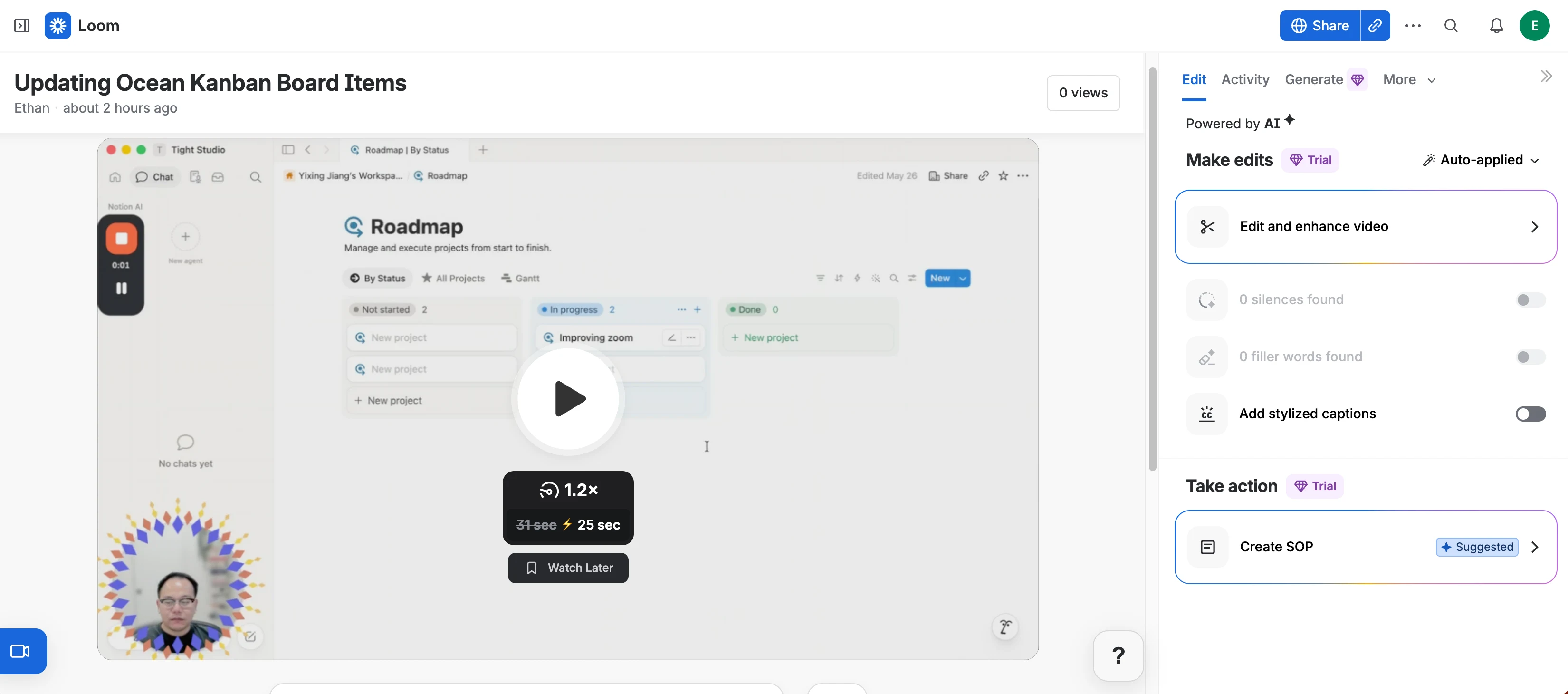
Loom: the hosted video page and share link appeared immediately after recording in our August 2026 test.
What stood out in testing:
- The share page combined comments, reactions, transcripts, viewer analytics, chapters, calls to action, and access controls around the recording.
- Paid editing tools included waveform trimming, transcript-based cuts, video stitching, captions, overlays, and background music.
- Loom AI could turn a recording into documentation or a step-by-step workflow, while Gmail and Slack integrations fit internal communication well.
- Native Mac and Windows apps, a browser recorder, and mobile apps gave Loom the broadest capture availability in this list.
Tradeoffs:
- Loom did not reconstruct the cursor or add editable automatic zoom after recording. Camera placement and most presentation choices were flattened into the capture.
- The Starter plan was limited to 25 videos per person, five minutes per recording, and up to 720p when we checked Loom’s official pricing page.
- The hosted playback looked softer around interface text than the locally rendered comparison export in our test.
- Several useful editing features, including transcript editing and stitching, required a paid plan.
Loom is the better Screen Studio alternative when the goal is to explain something quickly, send a link, and collect team feedback. It is not the right substitute when polished post-recording camera movement is the reason for choosing Screen Studio.
9. Recordly - the free open-source cross-platform alternative
Recordly was the closest completely free, cross-platform automatic-zoom editor in our Tight Studio vs Recordly test. Its desktop app ran on macOS, Windows, and Linux, and its source code was publicly available.
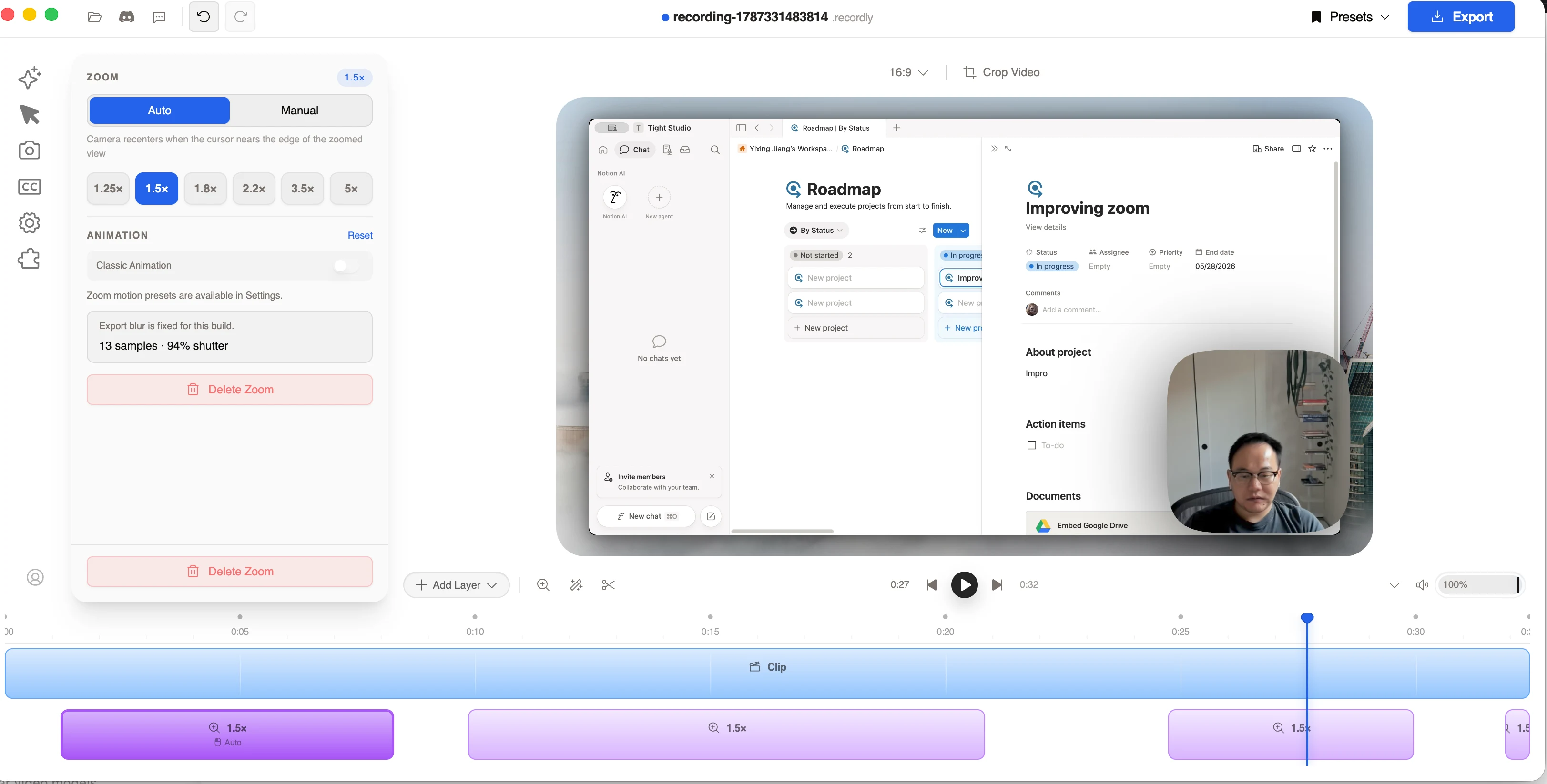
Recordly: automatic zoom remained editable as a timeline segment with automatic and manual targeting.
What stood out in testing:
- Automatic zoom produced attractive zoom-ins and smooth pans, with manual targets and several magnification presets available for cleanup.
- Cursor controls covered size, motion blur, click bounce, speed, sway, visibility, and looping.
- The editor included a broad background library, webcam crops, locally generated captions, and timed text, image, arrow, and blur annotations.
- Finished exports were free and unwatermarked in the build we tested.
Tradeoffs:
- We did not find microphone audio, music, AI narration, multi-clip projects, imported video clips, iPhone capture, or camera-only recording in the tested build.
- Exporting the comparison project took roughly twice as long as Tight Studio in our test.
- The extension marketplace returned a Cloudflare 525 error during testing.
- Recordly’s original maintenance path was uncertain when we reviewed it, with community members announcing Beam and NekoCut forks. That makes long-term support harder to predict than the feature list alone suggests.
Recordly is a compelling Screen Studio alternative for someone who wants free, open-source automatic zoom on Windows, macOS, or Linux and can accept a smaller editing workflow plus project-continuity risk.
10. Tella - the Windows alternative for multi-clip stories
Tella paired automatic zoom with one of the strongest browser-based storytelling workflows in our Tight Studio vs Tella comparison. It offered native Mac and Windows recorders, browser capture, camera-only recording, clip uploads, and reusable clips inside the same project.
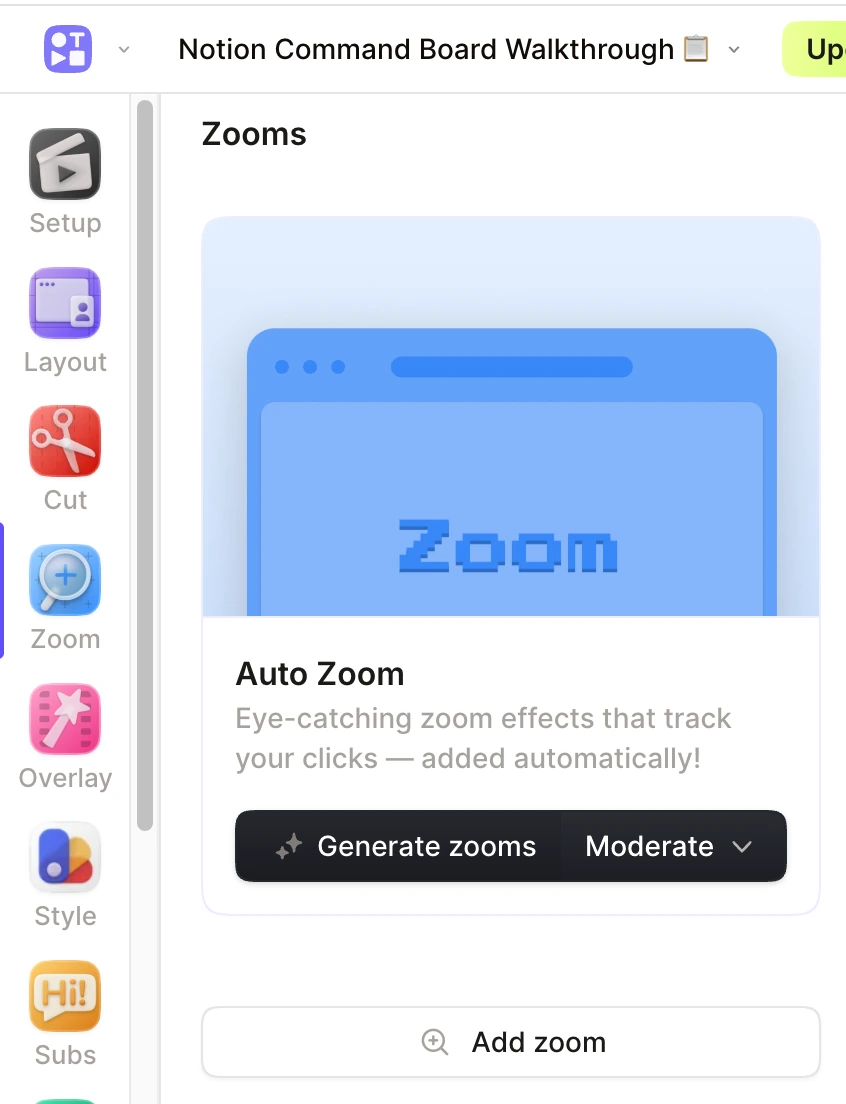
Tella: choose an automatic zoom style, generate zooms after recording, then edit the resulting cards.
What stood out in testing:
- Generated zooms were editable, with Adaptive, Subtle, Moderate, and Intense styles plus manual targets and custom scale.
- Multiple clips, uploaded footage, camera-only takes, layouts, transitions, captions, overlays, blur, highlight, music, and hosted pages supported longer product stories.
- Automatic cleanup could remove mistakes, buffering, and silence, while Studio Voice improved recorded speech.
- Hosted pages added transcripts, chapters, comments, documents, and viewer tools around the video.
Tradeoffs:
- Tella offered a seven-day Pro trial rather than an ongoing free tier. Pro was $13 per month billed yearly when we checked.
- Editing and processing were cloud-based rather than a fully local Screen Studio-style workflow.
- We did not find AI narration, personal voice cloning, direct iPhone recording, or post-recording cursor smoothing and replacement.
- The generated zooms in our test introduced some unnecessary drift, and Tella did not expose a motion-blur control for faster pans.
Tella is a strong Screen Studio alternative for Windows users and teams that assemble several clips into a hosted presentation. Its multi-clip and cleanup tools are more important differentiators than a pixel-for-pixel match for Screen Studio’s motion.
The decisive differences among Screen Studio alternatives
Screen Studio still has a coherent combination that none of these tools copies exactly. Its automatic zoom is polished, transcription stays on the Mac, microphone audio can be normalized and cleaned automatically, system audio can be limited to selected apps, and compatible Intel Macs are supported.
The alternatives separate those advantages into different directions:
- Broader post-recording editing: Tight Studio and Camtasia.
- Windows plus automatic zoom: FocuSee, Cap, Camtasia, Recordly, and Tella.
- One-time Mac pricing: Screen Charm and CleanShot X.
- Open-source ownership: Cap, Recordly, and OBS Studio.
- Live scenes, streaming, and audio routing: OBS Studio.
- Instant hosted communication: Loom and Tella.
- Automatic removal of mistakes and silence: Tella.
- Offline captions: FocuSee and Screen Studio itself.
- Script-generated narration: Tight Studio, or Camtasia Create through Audiate.
That is the useful way to narrow the list. Start with the Screen Studio capability you cannot give up, then choose the alternative whose tradeoff affects you least.
Frequently asked questions about Screen Studio alternatives
What is the best free Screen Studio alternative?
Tight Studio is the closest free alternative for the polished post-recording workflow on an Apple Silicon Mac. Its standard exports do not have a watermark, and it includes automatic zoom, cursor smoothing, backgrounds, captions, masks, music, GIF export, iPhone and iPad capture, and limited sharing. Cap is free for personal use and adds open-source code plus Mac and Windows support. Recordly is free and open source across Mac, Windows, and Linux, although its tested editor was missing several audio and multi-clip tools. OBS is completely free for commercial use but does not include automatic zoom or a post-capture editor.
Is there a Screen Studio alternative for Windows?
Yes. FocuSee, Cap, Camtasia, Loom, Recordly, Tella, and OBS Studio support Windows. FocuSee, Cap, Camtasia, Recordly, and Tella include automatic post-recording zoom. Loom focuses on fast hosted communication, while OBS focuses on live composition and recording without an integrated editor.
Which Screen Studio alternatives have automatic zoom?
Tight Studio, FocuSee, Screen Charm, Cap Studio Mode, Camtasia, Recordly, and Tella all provide automatic zoom. Tight Studio, FocuSee, Screen Charm, Cap, Recordly, and Tella keep the workflow close to a focused screen recorder. Camtasia uses SmartFocus and separate animation tools inside its larger editor. Loom, CleanShot X, and OBS Studio do not provide built-in post-capture automatic zoom.
Is there a one-time-purchase Screen Studio alternative?
Screen Charm costs $79 once and is the closest one-time-purchase alternative for Mac automatic zoom and cursor polish. CleanShot X costs $29 once but has a much lighter video editor and no automatic zoom. FocuSee offers a $199.99 lifetime plan for version 2.x, with major-version upgrades and AI-credit limits handled separately.
What is the best open-source Screen Studio alternative?
Cap is the most complete open-source alternative because its Studio Mode includes automatic zoom, cursor controls, backgrounds, captions, camera scenes, and a timeline. Recordly also provides automatic zoom and an open-source editor on Mac, Windows, and Linux, but its tested workflow was missing microphone audio, music, and multi-clip assembly, and its project continuity was uncertain. OBS Studio is open source too, but it is designed around live scenes, recording, and streaming rather than Screen Studio-style post-capture polish.
Does Screen Studio have advantages over these alternatives?
Yes. Screen Studio combines polished automatic motion with selected-app system-audio capture, on-device transcription, automatic microphone normalization and noise reduction, iPhone and iPad capture, share links, and support for compatible Intel Macs. Its trial cannot export, and the completed app remains macOS-focused, but those strengths can justify the subscription when they match the recording workflow.
Why are some screenshots less sharp than others?
Screen Studio, Screen Charm, and FocuSee block direct screenshots of their editors. We photographed those interfaces with a phone during testing. Differences in sharpness, color, and framing reflect the capture method, not the quality of the apps or their exported videos.